Links

Digital Marketing, Youthup Wire

45 Slack Tricks to Boost Productivity & Improve Collaboration

Slack is an undeniably popular messaging channel for businesses — it’s used by over 12 million people worldwide, and 87% of its users say Slack improves communication and collaboration. As a daily Slack user myself, I can attest that it’s an incredibly helpful tool for sending quick questions to your manager, organizing meet-up times with colleagues, or even sharing the occasional dog photo in the company’s #dog-channel. However, despite using Slack daily for the past two years, I had no idea that I could star important messages (which essentially “bookmarks” them), set up reminders within Slack to respond to messages whenever I’m ready, or create a custom emoji. There are plenty more tricks to using Slack more efficiently, as well — here, NetCredit collected 45 of them. Take a look at this infographic to learn how you can streamline your own processes to become more productive while using Slack, or how you might create a better experience for your colleagues.

Digital Marketing, Youthup Wire

How to Create Detailed Buyer Personas for Your Business [Free Persona Template]

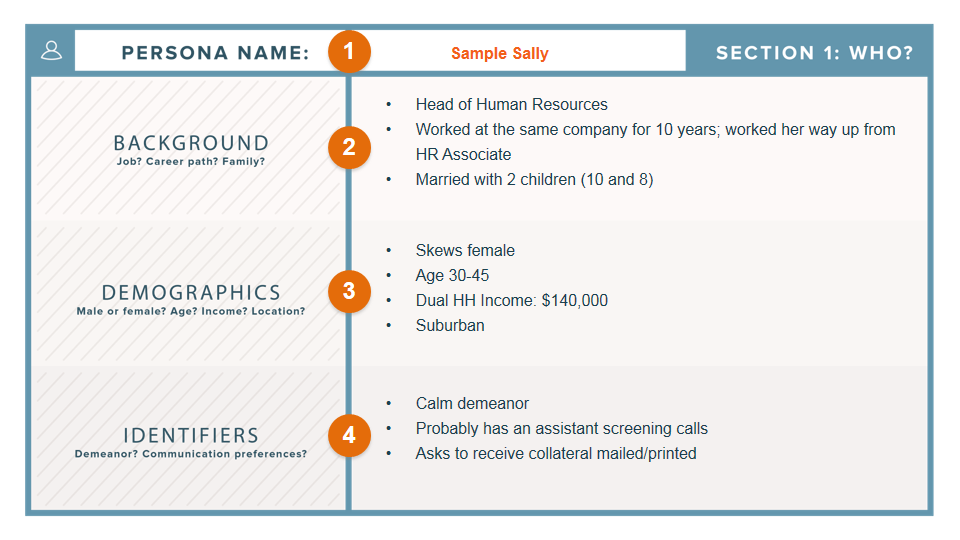
Marketing Margie. Sales Sam. IT Isabel. Accounting Alan. Do you know who your business’s buyer personas are? And if so, how much do you know about them? Buyer personas are semi-fictional representations of your ideal customers based on data and research. They help you focus your time on qualified prospects, guide product development to suit the needs of your target customers, and align all work across your organization (from marketing to sales to service). As a result, you’ll be able to attract high-value visitors, leads, and customers to your business who you’ll be more likely to retain over time. More specifically, having a deep understanding of your buyer persona(s) is critical to driving content creation, product development, sales follow up, and really anything that relates to customer acquisition and retention. “Okay, so personas are really important to my business. But … how do I actually make one?” Ahh … the million-dollar question. The good news is, they aren’t that difficult to create. It’s all about how you obtain your market research and customer data, and then present that information within your business. Follow along with this guide and download these persona templates to simplify this process. Before you know it, you’ll have complete, well-planned buyer personas to show off to your entire company! Before we dive into the buyer persona-creation process, let’s pause to understand the impact of well-developed buyer personas on your business (most specifically, your marketing efforts). Why exactly are buyer personas so important to your business? Buyer personas help you understand your customers (and prospective customers) better. This makes it easier for you to tailor your content, messaging, product development, and services to meet the specific needs, behaviors, and concerns of the members of your target audience. Use HubSpot persona templates to easily organize your audience segments and make your marketing stronger For example, you may know your target buyers are caregivers, but do you know what their specific needs and interests are? What is the typical background of your ideal buyer? In order to get a full understanding of what makes your best customers tick, it’s critical to develop detailed personas for your business. The strongest buyer personas are based on market research as well as insights you gather from your actual customer base (through surveys, interviews, etc.). Depending on your business, you could have as few as one or two personas, or as many as 10 or 20. But if you’re new to personas, start small — you can always develop more personas later if needed. What about “negative” buyer personas? While a buyer persona is a representation of your ideal customer, a negative — or “exclusionary” — persona is a representation of who you don’t want as a customer. For example, this could include professionals who are too advanced for your product or service, students who are only engaging with your content for research/ knowledge, or potential customers who are just too expensive to acquire (because of a low average sale price, their propensity to churn, or their unlikeliness to purchase again from your company). How can buyer personas be used in marketing? At the most basic level, developing personas allows you to create content and messaging that appeals to your target audience. It also enables you to target or personalize your marketing for different segments of your audience. For example, instead of sending the same lead nurturing emails to everyone in your database, you can segment by buyer persona and tailor your messaging to what you know about those different personas. Furthermore, when combined with lifecycle stage (i.e. how far along someone is in your sales cycle), buyer personas also allow you to map out and create highly targeted content. (You can learn more about how to do that by downloading our Content Mapping Template.) And if you take the time to also create negative personas, you’ll have the added advantage of being able to segment out the “bad apples” from the rest of your contacts, which can help you achieve a lower cost-per-lead and cost-per-customer — and, therefore, see higher sales productivity. Different Types of Buyer Personas While beginning work on your personas, you may ask yourself, “What are the different types of buyer personas?” From there, it’d be simple to adjust one for your business — right?  Well, that’s not exactly how it works — there isn’t a set list of universally-recognized buyer personas to choose from, nor is there a standard for the number of personas you need. This is because each business (no matter how many competitors they have) is unique — and for that reason, their buyer personas should be unique to them, too. For these reasons, identifying and creating your different buyer personas can, at times, be slightly challenging. This is why we recommend using HubSpot’s Make My Persona generator (as well as HubSpot’s persona templates) to simplify the process of creating different personas.  In general, companies may have the same, or similar, categories for their buyer personas (e.g. a marketer, an HR rep, an IT manager, etc.). But the different personas your business has and the number of them your business requires will be tailored to who your target audience includes and what you offer your customers. Now, are you ready to start creating your buyer personas? How to Create Buyer Personas Buyer personas can be created through research, surveys, and interviews — all with a mix of customers, prospects, and those outside your contacts database who might align with your target audience. Here are some practical methods for gathering the information you need to develop personas: Look through your contacts database to uncover trends about how certain leads or customers find and consume your content. Use form fields that capture important persona information when creating forms to use on your website. For example, if all of your personas vary based on company size, ask each lead for information about company size on your forms. Consider your sales team’s feedback on the leads they’re interacting

Digital Marketing, Youthup Wire

A Content Marketing Playbook for Times of Crisis

The COVID-19 pandemic has sent businesses scrambling to pause plans, edit emails, and cancel campaigns. And while everybody seems to know what not to publish these days, many marketers are asking: what should we put out into a world in the throes of a crisis? It’s a conundrum facing countless creators across the globe. They’re wondering how to be empathetic without being disingenuous. How to offer value without seeming opportunistic. And how to be there for their audience without adding to the noise. These are important questions to ask at a time like this. Essential, in fact. But underpinning all of them is a much simpler question that gets to the very heart of what content marketing has always been about. A question that every creator staring at a blank canvas right now should be asking: how can we help? Because now, more than ever before, audiences are seeking help. Increasing Engagement Rates Entire industries have been forced into hibernation in recent weeks, but this does not mean audiences’ appetites for helpful content has gone away. On the contrary. Consumers are increasing searches for valuable information and engaging with businesses at record rates. According to an analysis of anonymized data from HubSpot’s global customer base, engagement with marketing emails, website traffic, and live chat sessions have all been on the rise, with email open rates an eye-catching 25% higher than pre-pandemic levels. Meanwhile, traffic to HubSpot Academy, our free online training program, has more than doubled in recent weeks, and our Marketing Blog has experienced a 40% increase in weekly organic traffic. The pandemic has triggered a striking surge in the very thing that many marketers care about most: audience attention. And such a high level of interest in the content companies are sharing, coming at such a sensitive time, places a huge responsibility on marketers to deliver materials that are not only relevant to the current moment, but genuinely impactful, too. Those that fall short run the risk of doing damage to their reputation — according to Edelman, “71 percent of consumers agree that if they perceive that a brand is putting profit over people, they will lose trust in that brand forever.” But those that succeed will leave a lasting impression on their audience — according to Gartner, brands that meet consumer’s needs at this time can “re-establish trust through customer-centric actions.” So, it is not only engagement rates that are high during this crisis. The stakes are high, too. And a situation this unique requires a unique strategy to match. When a Crisis Descends, Pause Before Planning When times of crisis strike, the first thing marketers should think about is what not to do. Planned projects, campaigns, and announcements should be reviewed and postponed if possible. For those assets that are released as planned, it’s likely they’ll need a new tone that’s appropriate for the new environment. Marketers should examine every article, email, ad, and social media post scheduled to be published to ensure that the tone of each asset is empathetic and respectful. If this sounds like a lot of work, it’s because, in many cases, it is. No one team can manage a company-wide content audit alone. Communications teams have expertise in developing messaging, social media teams have deep connections to their online community, email marketing teams have a strong understanding of brand tone, and customer-facing teams, including sales to service, have their fingers on the pulse of how customers are feeling — all of these teams should be consulted on content strategy during a crisis to ensure that a consistent and helpful approach is adopted across every touchpoint with the public. At HubSpot, before we began creating new content for the new environment, we significantly reduced the frequency of our social media posting, dialed back the promotion of a major product launch (CMS Hub), and created a centralized set of guidelines on how we as a company should be communicating during this crisis. Making such sweeping adjustments on short notice isn’t simple, but for us, two things helped make it easier. First, we have an established decision-making process for crisis communications that minimizes confusion in the moment. Second, by centralizing all of our customer interactions in a shared CRM, we’re able to see what communications customers are getting and roll out adjustments quickly to marketing, sales, and service. Creating New Content in Times of Crisis When it comes to creating new content during a crisis, marketers’ sole focus should be on delivering work that is genuinely helpful to their audience, without being opportunistic or adding more noise to a topic that has already been widely covered by others. According to research conducted by Edelman, 85% of people expect companies to use their power to educate their audiences during the COVID-19 crisis. For some companies, that could mean writing in-depth articles that offer expert advice on relevant topics or aggregating publicly available information to make it more accessible for readers. Intuit, for example, did this well when they teamed up with GoFundMe to create a Small Business Relief Initiative and when they built an interactive tool to help small businesses learn if they are eligible for government-provided financial relief. We saw similarly helpful content from Care.com, whose team leveraged their deep knowledge of caregiving best practices to share expert advice on the precautions for families and caregivers facing the global health crisis. These powerful examples directly address the situation at hand. But for other companies, providing helpful content could mean offering an alternative to the cacophony of crisis-centric content flooding feeds all day, every day. For example, NPR has unsurprisingly witnessed a spike in listenership to its news shows as people seek up-to-date, reliable information as the pandemic evolves. But it has also seen a 120% increase in weekly visits to its Tiny Desk Concerts — an entertainment series — indicating that audiences are not only interested in information directly about the crisis, but are also desiring content that provides an escape from it.

Digital Marketing, Youthup Wire

How to Audit Your PPC Campaign & Identify Metrics for Success

If you manage a Google AdWords account to supplement your organic SEO efforts, you know there are a plenty of metrics available to track and analyze. Sometimes it can be confusing and overwhelming. Since we all have limited bandwidth, it’s a good idea to narrow down the key metrics that really give you meaningful insight into what’s working — and what isn’t — in your paid search campaigns. Before we dive into the key metrics to track, let’s review a checklist to look over when you’re auditing your pay-per-click (PPC) campaigns. 1. Check your location and target settings. When you’re auditing your PPC campaigns, the first step should be to check your location targeting settings. To do this, ensure that you’ve properly set up the regions that your business serves. Keep in mind that you can also exclude locations where your company doesn’t have stores or can’t deliver to. Additionally, you can review geo-reports to see what locations perform best. By doing this, you can prioritize your ad budget by location. 2. Evaluate your ad compared to your landing page. After reviewing your analytics, you might realize that your PPC ads aren’t converting. When this happens, it’s time to look at your ads and see if your landing page follows through on expectations. For example, if an ad markets a “Free CMS,” but your landing page is focused on an inbound marketing certification, there’s going to be a disconnect. To avoid this, ensure that your headlines and ad copy match the landing page you’re linking to. 3.Use ad extensions. Ad extensions are one of the only ways to set your ad apart from the rest. Essentially, ad Extensions allow you to supplement your ad with additional information at no additional cost. The information could be your phone number, additional site links, or even ratings. If you don’t have these set up for your PPC campaigns, it might be time to see how they can enhance your ads. 4. Assess your keywords. When you choose keywords for your PPC campaign, you should consider the search volume, match type, and negative keywords. Usually, the keywords you’re targeting should have high search volume. Then, you should consider the match type on your keywords. For example, if you use broad match, then you’ll want to add negative keywords. If you use exact and phrase match, you’re more likely to get clicks and conversions, but you might miss out on other opportunities. Generally, it’s a good idea to target keywords with a high search volume and use broad match. Then, you should modify your campaign with negative keywords so you can increase your conversion rate. 5. Measure your success with analytics. When you want to audit your PPC campaigns, you have to take a look at your analytics. These analytics will let you know what campaigns have been successful and what hasn’t. When a campaign hasn’t been successful, then you can troubleshoot and figure out why. Now, you might be wondering, “What PPC metrics should I be looking at?” Below, let’s review five metrics that will give you the most bang for your buck. PPC Metrics If you have limited time, these five metrics will give you a great overview of your performance. I’m not saying you should ignore all the other available metrics, but tracking these five over time will provide a solid measure of your success. 1. Quality Score Quality Score is Google’s measure of the relevance of your keywords, used to ensure that searchers see relevant ads and have a positive experience. The factors that determine your Quality Score include: The click-through rate (CTR) of the keyword and its corresponding ad The relevance of the keyword and ad to the search query The relevance of the keyword to its ad group The CTR of the display URLs in the ad group The quality of your landing page It’s important to maintain good Quality Scores because Google uses them to determine your ad rankings as well as how much you pay per click. Even if you think you’ve dotted your i’s and crossed your t’s when it comes to keyword research, campaign structure, and ad text optimization, low average Quality Scores are an indication that you’re missing some piece of the puzzle. 2. Click-Through Rate Recently, I asked 17 PPC experts to tell me the top three PPC metrics they pay the most attention to when analyzing their AdWords accounts. Click-through rate was the #1 most common answer. CTR is important for several reasons, among them: It’s one of the most important factors in determining your Quality Scores It tells you whether or not your ads are relevant to searchers Low click-through rates are a sign that either your keywords or your ad creative (or both) need improvement. 3. Conversion Rate Another very popular answer in our PPC metrics interview, conversion rate tells you how many people who clicked your ad went on to complete the desired action on your landing page. Conversion rate is just as important as click-through rate -– you don’t want to pay for tons of clicks and traffic if none of that traffic ends up taking a meaningful action. Strong conversion rates mean that the money you spend per click is coming back to you in profits (that’s what we call return on investment, folks). 4. Cost Per Conversion As Joe Vivolo of KoMarketing Associates put it, “This obviously is the number that makes or breaks a campaign from a success/failure standpoint.” In other words, if you have to pay more to gain a new customer than that customer is actually worth to your business, then your campaign is failing; you haven’t attained a return on investment. 5. Wasted Spend Wasted spend is a measure of how much money you’re essentially pouring down the toilet by paying for clicks that don’t convert. In other words, it’s an ROI killer. The best way to reduce your wasted spend is through smart use of negative keywords. Negative keywords allow

Digital Marketing, Youthup Wire

The Ultimate Guide to Instagram for Business

More companies are using Instagram than ever before — there are now over 25 million businesses on Instagram, most of which are small businesses. To capture a new audience and engage with your existing customers, it’s critical you consider using Instagram for your business. With over one billion Instagram users, Instagram is one of the most popular social media tools at your disposal.Instagram has proven a worthwhile investment for marketing purposes. You’re able to market your products to a more targeted and engaged audience, and it’s cheaper than more traditional forms of paid advertising. Plus, it’s an undeniably powerful tool to spread brand awareness — in fact, 90% of Instagram users follow at least one business on the platform. But using Instagram for business purposes can seem daunting, particularly if you’ve only ever used it for personal use. Here, we’re going to explore how to leverage the power of Instagram for all your business needs. How to Use Instagram for Business Let’s delve into the six strategies you’ll need to employ to get the most out of Instagram. 1. Add Value With Your Content First and foremost, Instagram is a visual platform. To attract an audience, it’s critical you spend time delivering high-quality, thoughtful content. Instagram has the highest engagement rate, surpassing Facebook and Twitter. To succeed on Instagram, it’s essential you create valuable content that attracts an audience and encourages them to engage with your business. Consider how you can delight your customers while staying true to your brand. You don’t need to just post images of your product to spread brand awareness and increase sales. In fact, in some cases, it’s better if you don’t. For instance, Hot Pockets sells microwaveable pocket sandwiches. Admittedly, I wasn’t much of a fan of Hot Pockets — until I began following their business’s Instagram account. There are only so many times you can post a picture of a sandwich. Hot Pockets goes in a different direction. Instead, they appeal to their audience through humor, often posting relevant memes or funny quotes. For instance, in response to @ShallowDivers’ claim that Hot Pockets aren’t sandwiches, Hot Pockets responded with this: Ultimately, it might take trial and error to find the content that works best for your business. While Hot Pockets relies on humor, other brands like The North Face use impressive adventure images to appeal to their demographic. The point is, brands need to add value to Instagram’s community rather than using the platform for advertisements alone. This is critical for your long-term success. 2. Maintain a Consistent Theme Imagine each Instagram post as an individual page of your website — while each post should be good on its own, ideally you’ll need to create a cohesive theme to maintain an audience’s loyalty. It’s important to note, I mean “theme” in the broad sense, as it relates to everything from hashtags and captions to Stories and photos. You’ll need to create a consistent tone of voice and a unified feed aesthetic. Ultimately, the more specific and consistent you are with your posts, the more likely you are to attract your most authentic audience. You might think it’s better to appeal to more people through various themes, but ultimately, staking your claim in a specific niche will help you create stronger, more genuine connections. For instance, consider MVMT. Their feed is undoubtedly consistent, with similar filters and color palette, and an emphasis on darker, edgier images: Their consistency is equally obvious in their captions, with phrases like “Create a life you can’t wait to wake up to,” and “Unexplored paths lead to undiscovered stories.” In every post, you’ll see the same hashtag: #jointhemvmt. Undoubtedly, their followers both expect and prefer this type of content, or they wouldn’t have followed them in the first place. To continue delighting customers, it’s essential MVMT keeps true to their theme. 3. Engage With Your Audience Engaging with your audience helps your followers feel valued and, as a result, more connected to your business. There are plenty of ways to engage with your audience. You might reply to comments on your posts, participate in comment threads, run contests or giveaways, use Instagram Stories polls feature, or give shout-outs to followers on your Stories, particularly if they post something relevant to your brand. Halo Top Creamery does a fantastic job of engaging with their audience. They frequently post cute ice cream pictures with the caption “Ice cream is better with friends. Tag a friend you’d like to eat this with.” A simple “tag a friend” caption is an effective strategy for growing your audience since your followers will then tag friends who might not know about you yet. Additionally, Halo Top often does contests and giveaways, like this one:  By tagging winners in their posts, Halo Top incentivizes other followers to engage with their brand in the future. Additionally, Halo Top’s giveaways demonstrate their genuine commitment to connecting with their audience. 4. Consider Influencer Marketing As a consumer, you’ve likely seen the recent influx of influencer marketers on Instagram — and for good reason. By leveraging the power of an influencer, who is already authentically connected with her audience and seen as a trusted source of information, you’re able to spread brand awareness and drive sales. Micro-influencing in particular is a strong opportunity for brand endorsement. In fact, one survey found 82% of consumers are highly likely to follow a recommendation made by a micro-influencer. That surpassed the number of consumers who are willing to follow a recommendation from an average person, like a family member or friend.  You could use your budget and resources to invest in traditional advertising, but it’s often easier to create a more targeted, effective marketing campaign through influencer marketing. Ultimately, influencers have already cultivated an engaged, loyal following — by identifying the right influencers for your niche, you’re much more likely to find followers who will truly enjoy and support your products or services. 5. Implement an Instagram Ad Campaign There are two reasons

Digital Marketing, Youthup Wire

How to Master Content Marketing on LinkedIn

There are a few different avenues for sharing information on LinkedIn, but which one is the best method? And what if you’re not ready to invest in paid advertising? There has to be another option, right? The good news is that there is another option. In fact, there are a couple of ways that marketers can leverage LinkedIn’s platform for content distribution without having to pay for it. Looking to send out short, digestible content? Engage with a status update. Have something long and poignant to say? Publish an article.  To help you get a better handle on where and how to execute a content marketing strategy on LinkedIn, keep reading. I’ve covered everything you need to know from tips on content you should (and shouldn’t) share to how to determine the right frequency for posting.  How to Distribute Your Content on LinkedIn 1. Publish quick status updates. One of LinkedIn’s most underutilized features is the “LinkedIn Status Update” (also called your “Network Update”) in your LinkedIn Profile. This is one of the best ways to stay in front of your target audience on a consistent basis. And when used correctly, these little messages pack a big punch. Your status update “block” is a white box located just below your picture on your homepage. Whenever you share an update, your message is then broadcast to all of your network connections.  You can also control the visibility of your posts before sharing. This means that you can pick and choose which posts you want to share with everyone, share with just your connections, or share with both everyone and your Twitter network. While updates serve as a great place to share your thoughts, linking in a blog post or interesting website will help you to provide an even richer source of insight.  4 Tips for Sharing Updates on LinkedIn  Share links to interesting articles, websites or videos. Use words that grab the readers and encourage them to click the link. Attach a document to your status update. Your audience might appreciate receiving checklists, white papers, or case studies. Job seekers, this is a great place for your resume. Mention a person or situation that might be helpful to some of your connections. For instance, “I just met with @AlexPirouz from @Linkfluencer and found out they’ve just won the readers choice award from Anthill Magazine.” The “@” before an individual or company name allows the reader to click through to that person’s LinkedIn profile or company page. Talk about an event you are attending or have attended. This might encourage involvement and/or questions about what you learned there. 5 Things You Should Avoid When Sharing Updates on LinkedIn  Talking about what you had for breakfast (or your cat). LinkedIn is a professional network. Before you post, make sure that what you’re sharing is relevant to your audience and provides value. While your pancakes this morning may have been delicious, this isn’t the place for it.  Being a spammer. While it may be acceptable to post 20 times a day on Twitter, the landscape of LinkedIn is a little different. To avoid coming off as spammy, try to limit your updates to no more than a couple times per day. Talking about sensitive topics. I am too embarrassed to even think about, let alone share, some of the items I see posted as status updates. If your mother wouldn’t want you talking about it, don’t include it in your status. Continually pitching products and services. This takes people back to the days of big newspaper ads and screaming radio messages. This is not the purpose of social media, especially LinkedIn.  Don’t bother posting when no one’s looking. The update you posted at 11:30 p.m. on Friday probably won’t get much traction. Try to align your posting schedule with the business hours in which people in your industry operate. Of course, this varies if you have a global audience. 2. Publish and share an article on LinkedIn Another powerful way to distribute content on LinkedIn is through the publishing platform. With all members now having access to the platform, it serves as a great opportunity to expand your reach in a major way.  I was first made aware of this feature when a friend of mine posted an update on Facebook mentioning how his article on LinkedIn managed to achieve over 6000 views and 550+ shares in little over 10 hours. I was intrigued, so I decided to conduct an investigation to see how it all worked. I decided to test it out by publishing one of my articles, “5 Things All Great Leaders Have In Common.” Given that it was my first time publishing on the platform, I had no idea what to expect. However, what happened next totally blew me away … Within a matter of minutes I started receiving invitation requests and messages on LinkedIn from members who had came across my article.  Within a matter of hours the article had gone viral — achieving over 70K views, 11K+ shares, and close to 500 comments. Over the years, I have written hundreds of business articles but none of them had achieved the exposure and interaction that this one did.  In addition to the exposure, I also managed to secure a few speaking engagements and an opportunity to coach clients for our business advisory firm.  And while the article continued to gain traction as time went on, I couldn’t help but think that it was too good to be true. Unable to shake this thought, I decided to publish a few more articles over the coming weeks. Whilst none of them achieved the level of exposure my first article received, each article has now reached 10k+ views, 1000+ shares and 100+ comments on average. If my success story wasn’t enough to sell you on the value of this platform, maybe the following benefits will. 3 Key Benefits of Publishing Long-Form Posts  Targeted audience. Considering a majority of your connections are like-minded professionals, it’s easy select topics that will resonate. This type of shared interest provides an opportunity to

Digital Marketing, Youthup Wire

Digital Marketing for Manufacturing Industry to get New B2B Leads

Why Manufacturing industry needs Digital marketing Manufacturing industry is mostly relying on traditional type marketing which is by far different than new age marketing.  Let us see that first how? Traditional marketing Vs Digital Marketing TRADITIONAL MARKETING More expensive Content creation is difficult  One way communication Difficult to measure ROI Audience reach is somewhat limited Harder to reach specific target audiences DIGITAL MARKETING Comparatively economic Content creation is convenient Two way communication with audience Data driven statistics provide accurate measures for ROI Audience reach is vast Easier to identify and target specific target audiences. You know what? Today the manufacturing industry is investing lowest among every industry for digital marketing.  ie 2.3 % and then mining and construction ie 3.0% Source : Web Strategies Inc  Well this is an interesting opportunity to rule the market. Isn’t it? As the digital market is not crowded with many manufacturing industry players, this is a right time to hit the hammer. 1.Your buyers are online   Buyers are increasingly rely on online research to get best solution nearby   According to study, 94% of B2B buyers research online before purchasing any business product.   And 56% of engineers are already in their second or third buying stage process before they even contact the sales team.   2. All competitors are yet to leverage digital power.   Competitors may not have considered this option of gaining business. 3. A Platform to exhibit your capabilities/expertise 88% of manufacturing marketers who use digital marketing for their companies believe that increased content creation has led to an increase in success over the last year. Platform helps you speak more about your company and educate your customer about your product, and the more valuable you become to them. Digital marketing platforms offers direct link to your buyer where you can demonstrate your strengths 4. Increase in visibility  Good for branding purposes. GENERATE MORE LEADS !! Digital marketing can generate 50% more business from existing customers. Generating more leads will lead to increased sales   Your website and social media outlets track leads Landing pages, lead boxes and downloadable can entice potential customer   SEO also plays an important role in bringing in traffic and tracking potential leads   Getting in touch with positional buyer through emails notifications social media etc can ensure buyer conversions   80% of brands that use marketing automation have seen a boost in their leads.   77% of marketers have noticed a significant increase in their conversion rate due to successful digital marketing campaigns How to go Digital Effectively STEP 1: Set Goals and objectives. Setting it before taking any step in any direction can help save billions. Break down in to yearly, monthly, weekly and daily goals. STEP 2 : Make responsive website  Your buyers are online and on the go thus mobile responsive websites are very important. Many potential buyers start with online research, to buy from you. STEP 3 : Do SEO  Match the search intent organically by doing regular posting SEO content and perfecting the website with Technical SEO. Blog post and Case studies, Video content, Infographic content etc. Check out a post this for content marketing for business . STEP 4 : Google Search Ads Google search ads are also called as search engine marketing.Search ads campaigns should be optimized to get leads. In the manufacturing industry we have observed that marketers make this mistake of placing bids against highly competitive words, without having any idea that those words are highly competitive because those are popular among Job searching people. And they end up getting job applications rather than an actual leads. STEP 5 : Social Media Marketing Social media is a place to become word of mouth. Thus social media ads both organic and paid becomes as crucial as any other marketing channel. If done wrong it can backfire, if done right it can be a great boon. Smart marketers are hacking the growth and excelling in results. How to do social media ads for the manufacturing industry is a topic itself which we would cover in an upcoming article soon. STEP 6: Email campaigns B2B businesses of any kind, use email as a primary source of communication that’s obvious. And hence it becomes the most effective in the manufacturing industry.  To leverage email effectively as marketing campaigns, start with addressing pressing issues and Updates  in the mechanical industry via Newsletters . STEP 7 : Measure and Optimize Measuring or tracking your goals helps reach heights, else you would do something wrong and you would never know. After measuring, it’s time to optimize the campaign. Measurement and optimization are infinite loops for growth. End Thoughts We have reasoned out Why to do digital marketing to get leads in manufacturing industry or mechanical industry and how part of  it. Start now before it gets too late. Comment down your questions. We would love to help you. That’s all folks , Until next one. Cheers. The post Digital Marketing for Manufacturing Industry to get New B2B Leads appeared first on Bluenest.

Digital Marketing, Youthup Wire

How Dynamic Content Makes Your Marketing More Personal

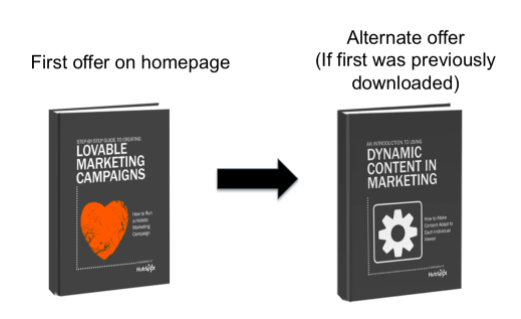
The first time Amazon introduced me to the perfect book for me via their recommendation engine, I was completely awed. The idea that a website could not only recognize a return visitor, but also discern their interests and alter their site experience accordingly felt like nothing short of magic. For instance, when I check Amazon’s site, I can find numerous personalized recommendations just for me, and it still feels like a delight, every time. Since then, data-driven personalization has become more common, though not entirely pervasive in the marketing space — perhaps due to a lack of understanding around how it really works. I mean, just what drives all this highly adaptive content? More than that, how does adaptive content affect a lead’s decision-making process? That’s what we’ll go to in this post. I’ll break down the concept of “smart,” or “dynamic” content, explain what it is, how it works, and give you some strategies for incorporating it into your marketing. First, let’s explain what dynamic content is and why it’s important to use for your business. What is Dynamic Content? Smart content delights customers. When you utilize data-driven content, you can influence a lead’s buyer journey. Let’s talk about what exactly dynamic content means. Dynamic content creates an experience that’s customized specifically for the visitor or reader at that moment. One of the most well-known examples of smart content is Amazon’s recommendation engine, which we talked about earlier. Other forms, however, range from personalization fields in emails to entire images or offers on a webpage that shift based on who is looking at them. For example, let’s say I visit an ecommerce site for the first time. During this first visit, I browse around, click the “like” button on a few products, and maybe purchase something. When I come back a couple of weeks later, the home site has now changed to say “Welcome back, Kayla!”, and recommends items I might like based on my history. Suggested items were chosen based on what I purchased previously, and the information I gave while purchasing, such as my name, was stored by the website’s scripts to create a personalized experience the next time I visited. Dynamic content also works with ads. Earlier this morning, I browsed a cosmetics site I hadn’t visited before. After closing the website, I opened Facebook, and all of my ads were from that company I’d just visited. Facebook chooses ads to show users based on their browsing history and interests, so when I visited that makeup website, Facebook found the ads from that business and displayed them on my feed. Now that we have a deep understanding of dynamic content, let’s take a look at how it works. How Dynamic Content Works The key to dynamic content’s effectiveness is its relevance. This content is developed from data known about the user based on behavior. The data collection works by scripts in a webpage’s HTML that changes to make the page relevant to the user. This data is stored in the site’s database, and is what’s called a database driven website. If a website is database driven, it’s dynamic. This is because most of the content on these websites are stored in its database. The content being stored is user data that’s then used to create personalized experiences. Ultimately, dynamic content is collected from what the user gives the website, such as an email address, first name, or shopping history. This data will be organized and stored in database driven websites with associated values — think of this as a filing system. The website then assess the need of the page and shows the viewer content that’s relevant to the user. There’s two different types of content-based websites, however. Other than database driven, dynamic websites, there’s websites that have its content stored in HTML files, known as static websites. Next, let’s go in deeper about the differences between dynamic and static websites and how they work together. Dynamic content vs static content As we’ve learned, dynamic content is powered by a database driven website. Static websites are powered by websites where the content isn’t stored on a database, rather HTML files. Generally, most are used to static websites. To sum it up, static websites are the ones that don’t recognize user behavior and change to be personalized. Think of pages you visit that don’t change based on your past behavior, such as ecommerce sites that don’t give you suggestions and marketing emails that don’t mention you by name. It might be a good idea to use static pages if you don’t have the time to devote to creating dynamic pages. Additionally, if you want to get more comfortable with running a website, static pages take less time to create, and you can still create a delightful experience for customers if you manage your website using software to manage your pages seamlessly, like a CMS. Even webpages that have a section similar to “Based on people you follow,” like Twitter, are dynamic. There’s awesome benefits to using dynamic websites, for instance, the personalized aspect can help improve KPIs like conversions and return visits. Other benefits include an improved user experience, clean web design, and low maintenance. A page that’s dynamic doesn’t need to be constantly updated — it’ll always be active. Technology dynamic web pages uses to be dynamic include: A Centralized Marketing Database — Your marketing database is the brain behind your dynamic content. It stores your contacts’ download and interaction history with your site. A Smart Content Generator — Informed by the database, a smart content generator will show or hide content (blocks of images or text) based on rules you set. Malleable Web Pages — A dynamic site has to be one that is easily editable and typically marketing-controlled, rather than run through another department like IT. An Integrated Email System — Extending smart content to the emails you send will require an email system that is tied into your contact database. To sum

Digital Marketing, Youthup Wire

How to Create an Editorial Calendar [Examples + Templates]

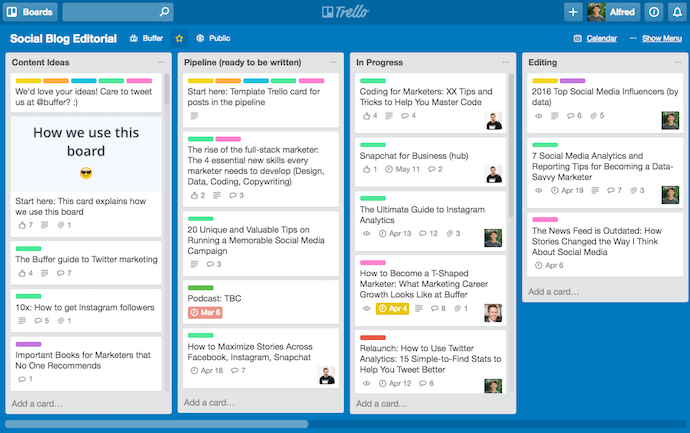
If you’re anything like me, you’re consistently working out of at least 20 browser tabs, four journals, a yellow legal pad or two, and a myriad of Post-it notes stuck around your computer monitor. To the average overseer, it’s nothing short of chaos. To the blogger, it’s evidence of a (desperate) need for an editorial calendar. My muddled system transforms dramatically when I work with a team. I realize the need for organization and structure, and this could not be more necessary than with managing a blog. Without a mutually agreed-upon system for planning, writing, and scheduling content every week, you can find yourself in a pile of missed deadlines, unedited blog posts, and a fair amount of team tension. There’s no such thing as a perfect editorial calendar — it all depends on the needs of your team. Nonetheless, there are a number of questions you should ask yourself to determine what your editorial calendar should look like. These include: How frequently are you publishing content? Do you have stuff going live every day? Once a week? Perhaps multiple times a day? Finding out how often you publish can tell you how best to visualize your editorial calendar on a regular basis. Do you create more than one type of content? If you upload as many videos to YouTube as you publish articles to your company blog, your editorial calendar will need to distinguish between the two. How many people will use this editorial calendar? The best editorial calendars allow multiple people to brainstorm, collaborate, and provide feedback on assignments in real time — directly on the calendar. What are the various stages content goes through before it’s published? How complex is your content pipeline? Is there a substantial review or approval process that each piece of content goes through? Make sure your calendar can distinguish between two similar assignments that are in different stages of creation. What format will you use to organize this calendar? You’ll want to choose the system that best aligns with your goals and your team’s workflows. The next section discusses the most common formats. Choosing a Format for Organizing Your Content Calendar There’s no such thing as a perfect editorial calendar, but some formats will be better than others at helping you solve for your team’s goals. Once you choose a format, you’ll also want to decide on how you will implement it — picking a tool or platform that offers the features or interface your company needs most.  Here are some of the different ways to format your editorial calendar:  1. Traditional Calendar or Calendar App Whether you’re tracking deadlines on a big paper calendar on your desk or through an app like Google Calendar, this is one of the most straight-forward ways to know what’s going out and when. The disadvantage, though, is that there’s more to project and content management than publishing dates, and a calendar may not always be effective enough on its own.  2. Spreadsheet Spreadsheets have always been a favorite for content management. There’s something so satisfying in seeing all your necessary data points aggregated in one place and organized neatly into rows and columns. With Microsoft Excel and Google Sheets, spreadsheets are easily accessible and don’t have a high learning curve. One advantage of using spreadsheets is that they can be easily paired with calendar apps and content management tools. By importing a .csv file, you can load the information into multiple places as needed for the tasks at hand (see the Google Sheets and Hootsuite Planner combination in the next section for inspiration).  3. Kanban Board or Other Project Management Tool Kanban is a visual system for project management that involves moving cards through different stages of a project. It’s popular in editorial management because it can be easily used to represent an editorial workflow no matter what your quality assurance process is or how many hands touch a piece before it’s published.  This means that a Kanban board can easily accommodate your content calendar if you require more planning and management to push things live. Popular options for this type of system include Trello, Airtable, and Meistertask. 4. Content Calendar (and Management) Apps Taking the calendar concept a little further, there are apps and software platforms that have been designed specifically for content management. They include both the calendar and the project management aspects that are required to get the job done along with other helpful features for high-volume content marketing teams. Examples of these platforms include CoSchedule, Contently, and Loomly. Editorial Calendar Examples To help you implement an editorial calendar, we’ve also included two real examples from a few of the most successful content teams out there. Check them out below and find out what makes their calendar so useful. 1. Buffer’s Editorial Calendar Platform: Trello This is the actual editorial calendar of Buffer, a social media content scheduling platform. Naturally, the company’s own content is supported by an editorial calendar that describes an assignment’s author, title, publish date, and where it is in the company’s editorial workflow (content can be in the “Ideas” stage, in the “Pipeline,” “In Progress,” or “Editing”). Each rectangular tile shown above represents an individual piece of content — whether it’s a blog post, video, or even a podcast episode. As you might be able to tell, Buffer’s editorial calendar is built on Trello, a common project management tool. And although you can use Trello more than one way, Buffer uses most of its available features so everyone has the information they need within a few clicks — regardless of what they do for the company and how the calendar affects their work. “An editorial calendar should be a resource for your whole team, not just content creators,” says Ash Read, Buffer’s editorial director. “It should be something anyone can easily access to see what’s coming up and also suggest content ideas. Sometimes the best content suggestions will come from people outside of your marketing team.” In the next screenshot, above, you can

Digital Marketing, Youthup Wire

16 Digital Marketing Ebooks You Can Download Today

About 60% of marketers believe that content marketing is important to their overall marketing strategies. When you think about your marketing strategies, what are the tools you’re using to deepen your understanding of the current landscape of digital marketing? As an ever-changing industry, it’s important for marketers to commit to learning as much as possible about digital marketing. But … who has the time? Enter: the ebook. If you want to expand your knowledge of digital marketing from reputable thought leaders, but have limited resources, or don’t even know where to start, this post is for you. Below, I’ll list some awesome ebooks on the ins and outs of digital marketing, from SEO, to content building, to beginner’s guides. Let’s jump in! 1. Digital Marketing for Small Business by HubSpot For this ebook, HubSpot teamed up with the experts at MOO to build a guide aimed at small businesses. It provides everything startups need to know about inbound marketing and gives a great scope of how to test, learn, and grow in an online marketing landscape. This ebook takes readers through accessible ways to maximize resources and get the greatest benefit from marketing. Need help with channels like Facebook, Google, and Twitter? “Digital Marketing for Small Businesses” has you covered. If you’re looking for a one-stop shop for how to start a functional digital marketing strategy from the ground up, this ebook is for you. It even provides templates and concrete examples that will help you organize your strategy. 2. Paid and Earned: The Two Sides of Influencer Marketing by Jay Baer Do you want to have a robust understanding of how influencer marketing can boost your ROI? This ebook shows you how influencer marketing is a great method for building brand awareness and boosting conversion, while offering a guide on how to choose between paid influencers or earned influencers. Author Jay Baer explores how influencer marketing can be a necessity for brands as well as the inverse relationship between the two. Baer discusses how different kinds of influencers have their own impacts on the industry and how to navigate working with influencers to maximize ROI. 3. The $10 Digital Media Startup Ebook by My Frugal Business If you’re building your business from the ground up and need a little help, this guide is aimed at guiding you through how to begin that process. This ebook is for those starting at level zero with building an online digital media strategy. It’ll walk you through fleshing out a social media strategy, SEO, influencer marketing, and how to become a successful digital entrepreneur. If you’re in the space where you have to multitask in order to get your business up and running, consider giving this ebook a look. 4. 25 Actionable Social Media Strategies You Can Implement Today by Buffer and Kevan Lee For this ebook, the team at Buffer collaborated with marketer Kevan Lee on social media strategies that are easy to implement. If you think a social media strategy is just about posting consistently, think again. This guide debunks that theory and explains how strategies also need to be delightful, effective, and targeted. You’ll receive advice that’s actionable and useful as you plan out or re-work your current strategy. For instance, you’ll learn how to leave a lasting impression on followers through content and when to post to leave the most impact. 5. Content Marketing: The Ultimate Beginner’s Guide to What Works by Search Engine Journal The team at Search Engine Journal put together a comprehensive ebook that focuses on how to build a content marketing strategy for those just getting started. Content marketing encompasses lead acquisition and the growth of your business — but only if it’s done effectively. This ebook is for anyone who wants a content marketing strategy that’s successful. It provides readers with an understanding of the value of content marketing and how to maximize your resources so you get the most bang for your buck. 6. How to Build a World-Class Internet Lead Generation Program by Peter Geisheker If you want to know how to attract more target customers to your online business this ebook should be useful. Author Peter Geisheker gives a crash course in improving lead generation, correctly. You’ll receive actionable tips about attracting customers, social media marketing, and how to retarget content to generate leads. Additionally, this ebook talks about how sales funnels work online and how having an online advertising plan in place helps you drive website traffic. 7. Data-Driven Content Marketing by Uberflip Content marketing works when it’s built from helpful, actionable data. With this ebook, you’ll become an expert at understanding the power of data analytics in building a content marketing strategy. Of course, data isn’t the only necessity when planning out content marketing. This ebook also dives into the creation process, distribution, and strategizing of a content plan that works for your company. This ebook will help you determine if your current content strategy is the best that it can be and provides valuable tips for marketers about how to improve what’s not working. 8. How to Run a Marketing Campaign with G Suite by HubSpot In this ebook, you’ll learn the best practices for digital marketing using Google’s tools. With so much to manage in the marketing landscape, you’ll learn quick, easy ways to become a rockstar at managing Google Suite, which streamlines marketing activities on a digital landscape. You’ll become comfortable with Google’s offerings of productivity and collaboration software to help your marketing efforts. This guide presents concrete examples of how HubSpot’s marketing team uses Google Suite to create, manage, and analyze campaigns giving you actionable takeaways as you become familiar with the platform. 9. Complete Guide to Crushing Your Influencer Marketing: Influencer Marketing Blueprint by Shane Barker Unsure about the true benefits of leveraging influencer marketing? Let this guide by Shane Barker lessen your uncertainty. It puts a digital marketing lens on the ins and outs of using influencer marketing to your advantage. This

Scroll to Top