Youthup Wire

Grab the latest from this knowlegde platform

10 Content Marketing Analytics Tools That Finally Do What You Need

70% of companies are actively investing in content marketing, and 60% regard it as an important part of overall strategic planning. These points emphasize the need for a strong content marketing strategy. A strategy is only as good as its tools. If you have a winning strategy, but unreliable resources to pull it all together, your plan might fall apart at the execution level. The challenge isn’t creating a strategy, but rather, finding the perfect tools to help you manage and work through your plan. You need tools to provide accurate metrics, the insights that will inform better decisions, and come ready with the customization options that will make your dashboard a functional asset. Here’s a list of analytics tools that will help you measure the impact of your content marketing. If you’re looking for customizable metrics, social media ROI, team collaboration, and SEO information, these tools are here to help. Content Marketing Analytics Your campaigns should be tracked every step of the way — not only for your benefit, but your audiences’. To continuously delight your customers, you have to know what’s working and what’s not. That’s why the tools you’re using to analyze results are so important — you get a better picture of who your customers are and how they interact with your content. Whether it’s a Twitter campaign, an email newsletter, or a new batch of offers, your strategy depends on content marketing to connect with customers. 1. HubSpot Marketing Hub Price: Starts at $40/mo. for Marketing Hub Starter HubSpot’s Marketing Hub was designed with the busy content marketer in mind. This set of tools offers robust analytics software to help you keep track of performance in one place. For example, you’ll be able to track customer lifecycles from beginning to end and configure reports by contact or company. This will help you analyze trends your customers display as time passes. Image Source Additionally, you have the tools to track website activity and analyze web behavior in a page-by-page breakdown. Locate the traffic sources that are most beneficial in bringing in customers with the metrics tool, and if you want to access this data based on a specific region or URL, you’ll have those options available. HubSpot’s analytics tools help you figure out how to drive value and target your campaigns so you’re performing campaigns that are going to bring you the most benefit. You’ll have nearly everything you need to make data-driven marketing decisions. 2. Buffer Price: Starts at $15/mo. for Buffer Pro Buffer’s content marketing analytics offer you the option to build reports according to your goals. You can add or remove custom metrics on the performance of numerous social media accounts. With these reports, you can export those reports for shareability. Image Source Your reports will be updated on a daily basis, so you can be sure you’re receiving timely data. Buffer’s analytics are designed to help you see channel performance at a detailed level, from one dashboard. The software offers engagement metrics for each account individually. This helps you gain an intricate understanding of how customers are interacting with social content. You can measure stories, posts, and hashtag performance, as well as access the demographics of your audience across channels. 3. Google Analytics Price: Free Google Analytics has an expansive system of tools for content marketing analysis. For example, you can use the software to access insights that are unique to campaigns you run with the search engine. The intuitive interface is easy to pick up, and it can be used to understand the performance of your content on multiple platforms. The analytics tool integrates with Google’s array of business software, so you can access insights in one place. 4. SimilarWeb Price: Free plan, or starts at $199/mo. SimilarWeb provides traffic and engagement industry standards and tells you where your website stands among them. This information is useful for discovering how your performance stacks up against that of competitors’. Image Source With SimilarWeb’s software, you’ll be able to break down the numbers of your content by daily active users, sessions per user, use time, and their rank. Discover more information about your audience, like their web behavior and interests, to improve acquisition strategy. When you have a deep understanding of how to acquire customers using SimilarWeb’s tools, you’ll know what type of content is most interesting to them. 5. Moz Price: Starts at $99/mo. for Moz Starter Moz measures the impact of your SEO-optimized content. You’ll gain insight about how your work is ranking among others in your industry and what keywords are the most effective to use in your strategy. Image Source Moz’s software will track your site’s keyword rank and how visible it is over time to learn what is and isn’t performing well among audiences. Additionally, track how competitors are ranking on search engine results pages; This will help you spot how they aren’t reaching customers and where you can reach them in your campaigns. Use Moz’s detailed reports to see how your content is reaching audiences and what you can do to improve that reach. 5. Hotjar Price: Starts at $89/mo. for 2,000 page views a day Use Hotjar to track sessions on your site. Hotjar provides heat maps of how and where customers are spending their time when they visit your website. They create real-time videos of how visitors are moving and clicking through your site. Image Source This allows you to hone in on what content is catching your customer’s eye. You can also track conversions and make inferences about which stage in the buyer’s journey customers might be leaving. 7. SEMrush Price: Starts at $99/mo. for Pro Though this tool is used for SEO tracking, it’s super helpful for digital marketers. Use it for tracking keyword performance in your latest campaign or to learn what language is grabbing your customers’ attention. Image Source SEMrush also provides tools for monitoring brand mentions. So if people are talking about your company online, in a LinkedIn post,

10 Content Marketing Analytics Tools That Finally Do What You Need Read More »

Help Us Improve: The 2020 Moz Blog Reader Survey Is Here

Posted by morgan.mcmurray It’s been a few years since we last asked you to tell us what you love (and don’t love so much) about the Moz Blog, and since then our company, our industry, and our world have undergone massive shifts.  With so much having changed, we wanted to be sure we’re still living up to the high standards we set for this blog, and that we’re still providing as valuable an experience as we can for you all. That’s where you come in today. To help us serve you better, please consider going through the survey below, which asks about who you are, what challenges you face, and what you’d like to see more of on the Moz Blog. We’ll publish the results along with our takeaways in a few weeks, and will use them to guide our work going forward. From all of us at Moz, thanks in advance for your time! TAKE THE SURVEY Sign up for The Moz Top 10, a semimonthly mailer updating you on the top ten hottest pieces of SEO news, tips, and rad links uncovered by the Moz team. Think of it as your exclusive digest of stuff you don’t have time to hunt down but want to read!

Help Us Improve: The 2020 Moz Blog Reader Survey Is Here Read More »

7 Companies Hosting Great Virtual Conferences

In April 2020, I attended the two-hour special “ACM Presents: Our Country“. In my pajamas with a bowl of popcorn, I was able to watch Miranda Lambert, Thomas Rhett, and Florida Georgia Line perform from their own living rooms. And, while the show didn’t have the same top-notch special effects as past country awards shows, it still managed to deliver exactly what I wanted: live country music. In 2020, many companies have needed to pivot to virtual conferences. HubSpot is no exception — for the first time in nine years, INBOUND, an event hosted by HubSpot, will not be held in-person. Instead, it will be a two-day immersive online experience. More than likely, we’ll continue to see a rise in virtual conferences over the coming years. It makes sense: Virtual conferences enable you to lower set-up costs as well as cost of admission, and increases the opportunity for people across the globe to attend. Whether you’re planning on pivoting your own in-person conference to a virtual experience, or simply want to attend a virtual conference in 2020, you’re in luck. Here, we’ve cultivated a list of seven companies hosting amazing virtual conferences. Best of all, these examples range in size from 50,000 attendees to a few hundred, so you can find inspiration regardless of your budget. 1. SaaStr Annual SaaStr Annual is the largest SaaS conference in the world, with over 50,000 SaaS executives, founders, and VCs in attendance. This September, SaaStr will still happen virtually, with over 200 live, handcrafted sessions and featured speakers ranging from Founder and CEO of Zoom to Chief Technology Officer at Shopify. The immersive experience will include speakers, AMAs, mentoring sessions, and one-on-ones with SaaS CEOs and leaders across the globe, with the goal of helping attendees scale their businesses faster. And, despite being virtual, the conference will still include opportunities to network and learn from peers in the industry. Fortunately, attending a virtual conference is much cheaper than attending in-person (especially since your company doesn’t also have to pay for travel expenses). In fact, you can attend SaaStr’s event for free with a two-day digital pass to access select live content. Alternatively, you might purchase the VIP Startup Founders & Execs Pass, or the Investor Pass, for full access and opportunities for networking and mentorship. 2. Venture Café More than 200,000 people have attended Cambridge-based Venture Cafe’s free networking, learning sessions, and office hours since 2010. The company enables small business owners and entrepreneurs to connect with industry experts, offers open mic nights for entrepreneurs to pitch their start-up ideas to the community, and hosts conferences that aim to connect entrepreneurs with investors and mentors. Ruth Saunders, Venture Cafe’s Vice President of Partnerships, told me Venture Cafe pivoted their in-person weekly Thursday Gathering to virtual on March 12, and have since hosted 12 virtual weekly Thursday Gatherings, four virtual conferences, and two pitch events. Their virtual conferences (including SheConnects, FinTech, and Digital Health) have amassed over 4,000 attendees. The company uses Remo, a virtual networking tool, to showcase startup demos and host networking events and clinics. Saunders says, “Every week, we try something new, and we’re constantly learning from our community and from other Venture Cafes globally.” Ultimately, it’s a good idea to assess how one virtual event performs before planning another — especially since you can use that information to iterate on your processes and find greater success in the future. 3. Penguin Strategies Penguin Strategies, a marketing agency focused on generating quality leads and improving conversion rates for B2B Tech companies, was planning a HubSpot User Group meet-up in March of 2020. Realizing an in-person event was no longer feasible, the agency pivoted to an online event in just three weeks — and secured over 1,000 attendees. Writing about the agency’s strategies in this blog post, CMO Shoham Eckhaus notes the company knew it was vital to give the marketing community an alternative platform for sharing ideas. Additionally, she shares four key takeaways for creating a virtual conference — “Deliver the right topic at the right time; share high-quality content from experts in the field; stay focused; and engage influencers to share with their networks.” Penguin Strategies’ event, which was aptly called “CMOs Surviving in a Panicked Economy” with featured speakers Kipp Bodnar (HubSpot CMO), Tyler Lessard (Vidyard CMO), and moderated by Penguin Strategies’ CEO, had an attendance rate of over 75% — greatly above the average webinar attendance rate of 44%. 4. Future For Us Future for Us, a platform dedicated to advancing women of color in the workplace, has seen massive growth in one year, quickly creating a community of over 10,000 women of color and allies across the U.S. as well as globally. The platform has been recognized in major publications including People Magazine, Vogue, and Forbes. In 2019, Future For Us hosted their first Assembly and jam-packed a conference space with keynote speakers, fireside chats and workshops, and panel discussions with industry leaders. However, in early 2020 they were tasked with pivoting the Future for Us Assembly from in-person to entirely virtual. Their virtual conference didn’t disappoint. The day-long virtual experience included the same panels, fireside chats, and workshops that made 2019’s Assembly so popular. Speakers included Tiffany Dufu, Founder and CEO of The Cru, and Minda Harts, best-selling author of The Memo: What Women of Color Need to Know to Secure a Seat at the Table. I spoke to Sage Quiamno, the CEO and co-founder of Future for Us, to learn the strategies she believes helped them successfully deliver a virtual experience.  Quiamno mentions a few best practices she urges other brands to consider when hosting a virtual event: “First, research different formats and technology tools that both big and small brands use to get their content out there and encourage engagement from their audiences. Second, I’d recommend hiring a technology expert in whatever platform you’re using. For me, I had a one-on-one consultation for Zoom to understand the ins-and-outs of the platform.” Additionally, Quiamno adds,

7 Companies Hosting Great Virtual Conferences Read More »

7 Steps to (Effectively) Branding Your Business on a Budget

In marketing, it seems like the word “brand” is used a lot — the leading brand, off-brand, personal brand … you get the picture. But there’s often confusion around its meaning in business. What does it entail? Should you hire an expert? Most of all — branding is expensive, right? Not exactly. As it turns out, there are some creative ways to brand your business effectively without a ton of cash. And while it can require an investment of time, the ROI won’t go unnoticed — in some cases, it can actually help you save money, while also growing your business. Building your brand is a crucial part of developing your business. It’s the foundation of giving your organization a voice, identity, value, and awareness among consumers. And, thanks to the plentiful number of resources, tools, and platforms available today, a brand build might not be as burdensome (or costly) as some think. So read on, and see how you can use the following seven steps as a guide for your brand build. How to Brand Your Business on a Budget You don’t have to break the bank to grow and maintain a brand. In fact, you can complete most of these tips without spending money. The most important things to remember when brand building are to keep your customers in mind and deliver messages that support your company’s mission. Below, let’s discuss a budget-friendly way to grow better on a budget. 1. Create a persona to understand your audience. You’ve probably heard that knowing your audience is the key to creating marketing messages that appeal to them. A great way to get to know them? Create a buyer persona — a semi-fictionalized representation of the values and characteristics of your ideal customer. Personas outline the challenges of that customer and where your business fits in to solving their problems. Below is an example of a buyer persona, Marketing Macy. Notice how my persona lists demographics, like age and education, as well as tools needed for the day-to-day, like a CRM. The needs, goals, and behavior of your potential customers dictate how you convey your product or service. So for Macy, I want to focus on a B2B strategy that caters to her goals of lead generation and brand building. Understanding those goals helps you determine what kind of media your personas are consuming, what motivates them, and where they “live” online. This information allows you to develop a compelling, effective brand that reaches the right people. Make your own buyer persona with HubSpot’s free MakeMyPersona tool, which guides you through a series of questions about your ideal customer. The tool is fun, interactive, and meant to get you thinking critically about who you want to reach with your brand and how you want to reach them. 2. Develop an identity and voice for your brand. Once you’ve identified your buyer personas, your brand can start to take shape. Create a brand identity — what makes your brand, your brand — and its voice, which is the tone you use in any copy or public communication. Developing brand voice and identity is similar to constructing your personas. But instead of answering questions about your target audience, you’re answering questions that are more introspective to your brand: What are your company’s values, what do they represent, and how do you want people to talk about you? When you answer these questions, focus on creating content that supports them. Craft compelling emails, blogs, social posts, and multimedia that reflect your company’s mission, values, and how you want to appear to customers. For example, if one of your values is to be accessible to customers, communicate contact information on social media pages and answer service questions that appear in comment sections. Developing your voice comes through in the copy of that content. Are you going to use conversational language that relates to customers? Or will it be more beneficial to reach your audience from a technical standpoint? For example, one of my favorite brands to follow is Glossier, a beauty company with a great understanding of brand voice. When I tag the company in a photo on Instagram, I usually get a reply with one of their famous logos: An emoji version of a smile and wave (🙂👋). This logo appears on the bottom of marketing emails and packaging, keeping the brand consistent across multiple formats. Even if you’re not starting from scratch, establishing a strong(er) brand voice can be valuable. Just take operating system software service Android, for instance: Their 2019 rebrand was a logo re-up, making the design cleaner and modern: Image Source The logo came from a need to speak to a shift in audience. Initially, Android’s target audience was the developer, but instead, the company has become more consumer-facing. The change was bred from this analysis. 3. Map out a consistent social media presence. So, we know who your personas are. And now, we have an idea of what and how to create messaging that connects with them. But where are they? Since you have a clear picture of what your audience is interested in, next, figure out where they’re spending the most time on social media. We’ve talked about how effective it is to reach people where they’re already present, and that includes their online behavior. Don’t worry, you don’t have to play Inspector Gadget to figure out where your audience spends time online. Check out competitors — see where they’re most active (and how their language may or may not connect to audiences). Additionally, look at how your audience interacts with social media. For instance, the highest percentage of U.S. men and women who use Facebook are between the ages of 24 and 35. So, if your persona fits that bill, focus your strategy on Facebook. If you find the majority of your audience prioritizes one social network, you’ll have an idea of where to allocate your resources. But don’t ignore other sites. When you build

7 Steps to (Effectively) Branding Your Business on a Budget Read More »

8 Engaging Examples of Interactive Storytelling in Content Marketing

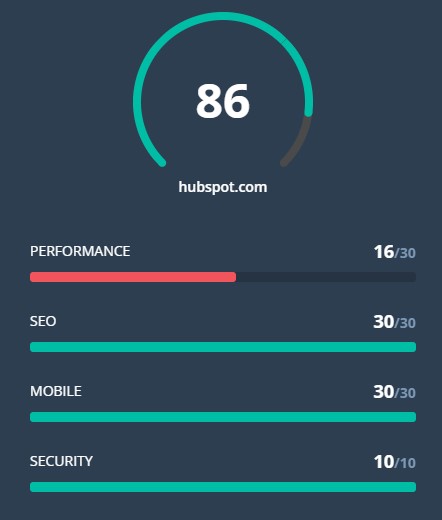
As inbound marketers, content plays an important role in attracting attention and building trust with prospects. Our content can come in many different formats, and the format we choose can speak volumes about the research and ideas within. Interactive content has become increasingly more popular as brands try to cut through the noise and keep prospects’ attention long enough to deliver a message. What Is Interactive Content? Interactive content is a type of content created not just for consumption but also engagement. It’s designed to prompt action and participation from the audience. The benefit being a higher likelihood of harnessing the audience’s ever-decreasing attention span by publishing stories with interactive elements so they gain an active role in consuming information. By dazzling the audience with an unexpected experience, you can increase engagement, on-site dwell time, and social share rates. Types of Interactive Content Quizzes Interactive Video Surveys and Polls Calculators Gamified Content In theory, any type of content can incorporate interactive elements. Interactive marketing requires ingenuity and innovation, and here are some of the ways interactive content currently shows up on the web:  Quizzes By their very nature, quizzes are interactive since input is required from the audience in exchange for valuable personalized content. Interactive Infographics Unlike static infographics, interactive infographics prompt the audience to take their own journey through the information being presented.  Interactive Video Video viewing is often a passive activity, but interactive videos can improve engagement and enhance the experience. This is done by adding 360 views, audience controls, or embedded content and interactivity.  Surveys and Polls If the audience wants macro data on a particular topic, they can be incentivized to take a survey. Then, both the survey (the input) and its results (your output) becomes consumable pieces of content.  Calculators In many cases, information itself may not be useful for your audience but rather how that information can be applied to their individual situation.  Gamified Content One of the best ways to turn content into an experience is by making it a game. Examples of this include playable game ads or interactive worlds.  You’re not confined to just these buckets, either. Interactive content is limited only by your imagination. Interactive Content Examples from Real Brands Each industry poses its own obstacles and unique characteristics, but share one common denominator: Interactive content works for all topics and audiences. 1. HubSpot’s Website Grader This personalized web experience allows users to type in their website and receive a detailed analysis based on different criteria. By pointing out specific pain points and providing actionable tips, the content turns into a lead-generator, getting the conversation between HubSpot and potential users started. How can you incorporate this into your content marketing? Personalization is key for building relationships with your audience. Pointing out opportunities for improvement and growth in an interactive way increases the trust your readers have that your brand is an expert in this topic and industry, which is easily done through interactivity. Think: “Show, don’t tell. 2. The Wall Street Journal Delivering a large amount of information is a challenge for content creators. This example from the Wall Street Journal does so using searchable, visual stats. The facts are arranged in a number of ways, including a recorded timeline for readers to hit “play” and simply watch. How can you incorporate this into your content marketing? Search is an interactive action on its own and can be easily incorporated into your content. Using search provides readers with a task to keep them engaged while presenting a healthy amount of information in a positive manner. Adding search options very much depends on the content you create, but tools like FlippingBook and Viostream make even PDF and video content searchable. 3. National Geographic Some of the most inspiring forms of interactive content match the topics they address. This example allows readers to follow the ancient cave paintings as if they are touring a prehistoric cave, with color-coded topics to provide insights. How can you incorporate this into your content marketing? Making history come to life can be a hard task. Don’t shy away from numbers and important facts, but don’t skimp on the imagery and engagement, either. Leave the canvas clear for creative imagery and video, while the text wraps the visuals but does not interfere. 4. Information is Beautiful Viewers love trivia about their favorite movies, and this is a visually appealing way to serve it to them. Breaking the movie down into specific scenes clarifies which parts are based on a true story, while color-coding gives readers a broader overview. How can you incorporate this into your content marketing? For a more holistic reading experience, allow readers to go back-and-forth between the small details and the big picture.    5. CNBC Adapting listicles to the age of video can be done by dividing a lengthy clip into Video Snaps. Each snap can be edited from a different video, and is assigned a customized title and color. Once viewed, readers can share the snap (or in this case, perhaps the side job) they enjoyed most on their social channels, or the entire article. How can you incorporate this into your content marketing? Instead of including full-length videos, cut to the chase (literally) and only include the parts that are truly instrumental to your message. Gone are the days of “skip to 1:32 to view this” video content. 6. The Solutions Project This interactive map presents data when hovering over specific states, and dives into the stats after clicking. This makes information that much more accessible, and gives readers the option to discover more, if they choose to do so. How can you incorporate this into your content marketing? For presenting a geographic distribution of data, create a interactive map to help readers visualize the topic. Check out free tools like Mapme and MapMaker Interactive to create your own. Using icons and uplifting design elements makes complicated topics seem more digestible. 7. Crown Courtroom This interactive animation aims (and succeeds) at educating readers about a potentially intimidating experience in a

8 Engaging Examples of Interactive Storytelling in Content Marketing Read More »

Mapping Local Essentials: Being the Business that Grows, Sells, or Markets the Beans

Posted by MiriamEllis Image credit: Kenneth Leung, Michael Coghlan “Dried beans saw a more than 230% increase in demand and rice sales spiked by 166% in that same time.” – ABC How should a business operate now? Where is there work to be done? Economists are making stark predictions about the future of small businesses in the US, but at the same time, I live in a town without a courier service established enough to meet the mushrooming demand for home delivery. Frankly, it’s devastating reading headlines forecasting the permanent closure of 7.5 million American SMBs, but while absorbing these, I also spent six weeks shaking the Internet for bathroom tissue before locating some 1,400 miles away. Point being: Where there’s need, fulfilment can be a public good, and where there’s upheaval, any possibility is worth considering. Necessities are emerging in bold relief on the map of each town and city. Demand must be met by determined small entrepreneurs to keep society functional. If you have a strong desire to actively support communities in new ways, by either retooling your existing business or even launching a new one, the doors of opportunity are open: Tools and exercises can help you assess local demand, with the goal of building a stable business based on serving the public exactly what it needs most. What I see emerging is a marketplace that’s essentials first, luxuries second. With a consumer public struggling to get its basic needs met, you want to own the business that grows, sells, or markets the dried beans if you can determine they’ll continue to be a must-have in all times and seasons. Let’s think this through together today. Map local essentials One of the hard lessons so many of us have learned from the past few months is that our local communities are neither prepared for disasters nor sufficiently self-sufficient to meet all basic needs. Where is the wheat field, flour mill, yeast manufacturer “near me” so that I can bake enough bread to keep my household going instead of staring at “out of stock” messaging on the websites of remote major brands? If you’re considering becoming part of the local solution to this widespread problem, I’d like you to try this simple city planning exercise with me. Take out a pen and paper, or open a design program if you prefer, and map out the essential needs of your community. Your community could be your city, or could be a larger geographic area such as a county. Include everything you can think of that human society requires, from water and food, to skills of all kinds, with an emphasis on long-term sustainability. Your map may look very similar to mine, or it could have substantial differences: Once you’ve created your own map, answer these five questions: 1) Based on what I currently know, where in my community are the worst, ongoing local resource deficits? For example, in my community, we make too much alcohol for the residents to drink and don’t grow enough food for them to eat. 2) From what the present emergency is teaching me, which local resources have proven both essential and hard to access during a disaster? For example, there is only minimal manufacture of necessities in my town and a tax base that hasn’t been geared towards safety from wildfire. 3) Where would my existing skills and passions fit most easily into this map today? My skills, for example, would enable me to teach almost any business in town how to market themselves. 4) What new skills and assets would I need if I want to adjust my current offerings or move to a completely different role in my community? Let’s say I wanted to be an organic farmer instead of a local SEO — how could I transition? 5) If large-scale government planning fails to ensure that all members of my community have what they need to support life, what are my options for cooperating with neighbors at a local level to ensure my city or county is more self-sustaining? For example, my city has a Buy Local association I might tap into for large-scale, organized planning. From this exercise, I want you to be able to tell yourself and others a compelling story about what your place on the map lacks and what it requires to become more self-reliant, as well as begin to gauge where you might personally fit in contributing to solutions. Assess local demand Now it’s time to research specific demand. How do you know what’s most needed at a local level? Try these tools and exercises and take notes on your findings. 1. Center your own experience and see if it’s trending More than anything else, it’s your powers of local observation that will tell you most about business opportunities. Businesses exist to solve problems, and right now, the problem we’re confronting is local self-sufficiency during times of emergency as well as in better days. Here’s an example of a problem. My household eats legumes at least twice a day in some form. We’ve always been able to get dried beans, lentils, and peas in bulk from the grocery store. However, with the public health emergency, stores ran out of stock and we had to order boxed products from an international brand headquartered far away. I can check to see if the problem I’ve noticed locally is part of a larger phenomenon by looking at Google Trends: Sure enough, this tool is reporting a spike in demand for dried beans across the US in mid-March. Of course, this isn’t a reason to run out and start a new business, but the data can engender good questions like: Have I identified an anomalous spike in demand or a permanent need? Is there explicit value for customers if this demand could be supplied locally instead of via distribution/online channels? Are there already local companies fulfilling this demand? If I got into this line of business, who would my local

Mapping Local Essentials: Being the Business that Grows, Sells, or Markets the Beans Read More »

The Ins and Outs of Writing Long-Form Content

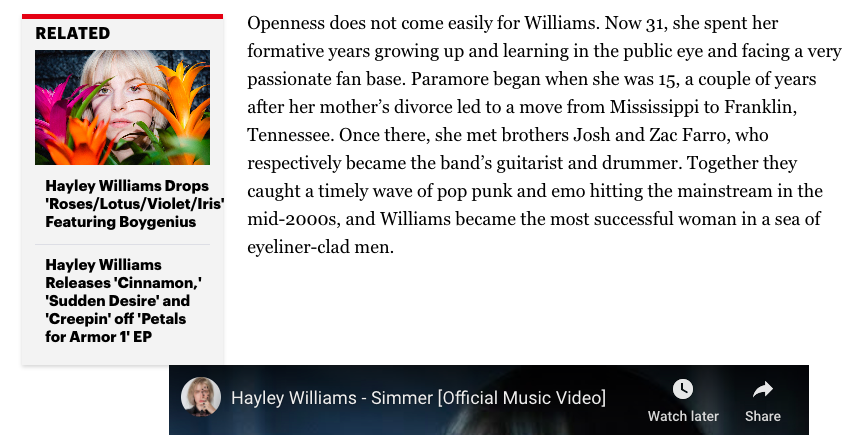
Let’s talk about content. More specifically, long-form content. Not only that, but why it’s a good idea to have on your website. Let’s say you’re looking for a resource about how to start an online business. You want a full rundown, concrete information, and actionable tips that will assist you begin a successful company. You’re probably going to want a lengthy resource that’s valuable, right? This is the glory of long-form writing. It gives you a chance to provide highly motivated readers with a ton of value and context. Long-form content generally has a word count of more than 1,000 words — so, it’s not the shortest read. That doesn’t mean that short-form content isn’t useful for your website. You should have both to serve different purposes. Let’s take a minute to look at how. Long-Form Content On the surface, long-form content doesn’t sound like it’s great for user engagement. It might seem counterintuitive to give your audience more to read in order to keep them on your website longer. But it’s true, and I’m going to dive into why below. I’m here, however, to debunk that myth. Let’s add a definition to the term, first. The purpose of long-form content is to provide valuable information to the reader. If you write long-form pieces — and make sure those articles are useful to your audience — you can increase the time spent on your site and value to your reader. More than that, if you optimize your website for search engines and add calls-to-action in the body of your piece, you can improve lead generation. Your articles will have a higher chance of showing up on the first page of SERPs, and you can guide readers to offers that relate to the topic of your work. Sounds pretty great, right? But wait — if there’s content that’s long-form, there has to be a short version, right? It’s important to know the difference between the two so you know how to best serve your audience. Long-form content vs. short-form content Short-form content can be extremely helpful to readers who want a quick answer to their queries. For instance, you can offer short-form content to provide a simple definition or explain a product in small portions. Short-form content gives your reader the information fast so their attention doesn’t wane. This type of shorter writing is generally under 1,000 words. It provides a general overview and saves readers time. Long-form content, on the other hand, goes deeper into topics. In addition to diving deeper into topics, long-form content can aid with ranking highly on search engines and build your website’s reputation. For example, this article, about how to write a blog post, has earned thousands of views. Additionally, the average time spent on the page is about four minutes. From these metrics, we can guess that this 17-minute read, well over 1,000 words, was successful in providing value to the reader. This doesn’t mean that you should fill your blog with 17-minute reads. But it can be useful to start thinking of how long-form content can be effective for your audience. How can you provide ample writing that’s actionable for readers? If you build an archive of long-form content that’s valuable for readers, you can create a reputation as a source people look to first to help them solve their questions. It’s kind of like ordering a product online. You’re probably more likely to order from a site you’ve used many times before, that has proved to be reputable, instead of trying out a brand new ecommerce option. Let’s look at another reason why long-form, valuable writing is successful: page rank on Google. Backlinko found that websites with a high “time on site” are more likely to rank highly on search engine results pages (SERPs). When a search query is typed into Google, the search engine crawls websites for content that will help solve that user’s query. Web pages that have a longer time spent on site than others suggest to Google that browsers found that information important enough to stay on that page. As a result, Google is more likely to suggest that page above others. (Don’t forget that a page optimized for SEO is also a huge boost to improving rank). So now you know why long-form content is important to have on your site: It provides values to readers, can earn you a reputable reputation, and brings more eyes to your site. But what does successful long-form content look like? Let’s take a look at some examples. Long-Form Content Examples Before we talk about how to write long-form content, let’s look at some effective examples. These examples show how long-form content can be optimized for the reader’s comprehension. 1. Hayley Williams Isn’t Afraid Anymore by Rolling Stone This long-form profile about solo artist Hayley Wiliams, written by Brittany Spanos for Rolling Stone, does a great job of performing other content produced by Rolling Stone about the same topic, or those that are similar. Within the profile, other works previously done by Williams or her rock band, Paramore, are featured and hyperlinked to previous RS articles that are applicable. For instance, the word “Paramore” was hyperlinked to an internal tag of the same name, showing all previous RS posts that mentioned the band. A particularly intriguing mention of past works related to the topic, Williams, comes up in the sidebar of the feature. There, you can find previous music reviews of the singer/songwriter’s releases. This is a visual way to promote past content, and one that catches the attention of readers. Image Source If you want to include other works in your long-form content that relate to the article, consider an approach similar to this one. You’ll give the reader a break from reading the piece to queue up similar posts for later. Additionally, you’ll provide more value to the article by offering up supporting ideas. 2. Getting Started with Google Remarketing Ads by Mailchimp Mailchimp is a marketing software

The Ins and Outs of Writing Long-Form Content Read More »

5 Ways to Use Audio in B2B Marketing

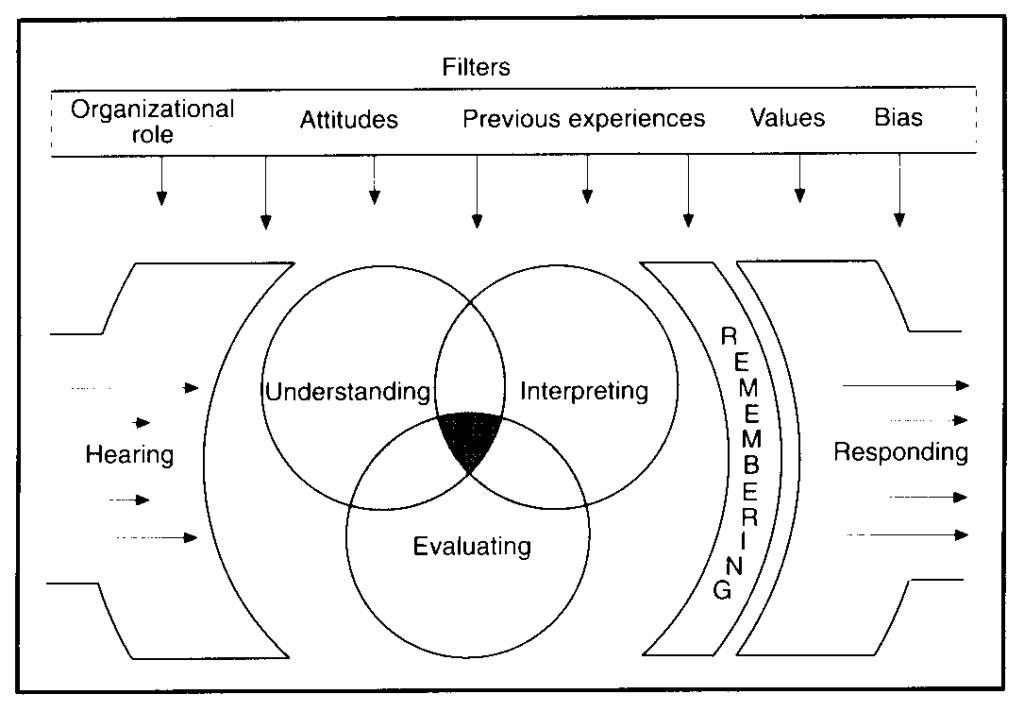
Whether you prefer to stream music in the car or listening to the hottest podcasts — odds are there’s some form of audio content that you love to consume. I too am one of those people who always has to be listening to something. Whether it’s a new Spotify playlist or the latest episode of a podcast, I use pretty much every opportunity to consume audible content. I’m hardly the only one who’s partial to audio in this way. With consumers spending more time alone or at home in 2020, marketers have noticed a major uptick in audio content and listenership. This isn’t shocking. In recent years consumers have increasingly turned away from traditional TV content in favor of mobile or online platforms — especially those that promote and produce audio content. At this point, marketers are taking notice of audio opportunities. Consumer listening behavior has created a tremendous opportunity for marketers — especially those in the B2B sector — to create branded, audible content. Audio is often associated with consumer marketing, but those kind of assumptions create a missed opportunity for B2B brands. After all, here at HubSpot, we create content for marketing and sales professionals in a variety of formats, and if you read our blog, it’s no secret that we’re constantly nagging you to do the same — even with audio. So let’s explore the ways that can be done, starting with a look at the science behind the act of listening. The Listening Process Before you start creating audio content, it might be helpful to understand how and why people listen. The act of listening, according to Merriam-Webster, is “to hear what someone has said and understand that it is serious, important, or true.” It also helps satisfy different physiological goals. We listen to alter our moods, stay alert, and figure stuff out. In humans, that’s been the case for pretty much as long as we’ve been in existence. The process starts when we receive auditory stimuli, which our brains then have to interpret. That’s aided by other senses — like sight — and helps us better figure out what we’re hearing. Once our brains have interpreted these auditory signals, we follow a series of steps that consist of recalling, evaluating, and responding to the information we consume: Source It’s that third step in the process — recalling — that might be the most important one for marketers. Numerous studies have discovered how listening triggers a widespread network of activity throughout the brain. That activity is what links auditory stimuli so strongly to memory. That might be why we love to talk about things we’ve heard, like a great song, for example. We’re actually sharing a story about our memory of what we heard. And that comes back around to what we do as marketers. We share the stories of and about our brands in a way that will get people to pay attention and listen to us. So, let’s get started, and begin creating content that people will listen. 4 Ways to Use Audio in B2B Marketing 1. Create or sponsor branded podcasts. According to Edison Research, podcast listenership has been on a steady rise since 2006. In 2018, podcast listenership saw a 26% YoY increase. Along with listenership, podcast revenue has also grown. By 2021, podcast ad spending is expected to hit $354 million. Source People often make the mistake of thinking that podcasts are largely consumer-facing. We think of those that are aired on public radio or hosted by celebrities for the masses of bored commuters trying to pass the time. But in reality, there are a number of B2B podcasts out there, like Duct Tape Marketing, ZenDesk’s Relate, and HubSpot’s The Growth Show. But when it comes to creating branded podcasts, many B2B marketers make similar objections that we used to hear about blogging — such as, “I don’t have time,” or, “I don’t have anything to say.” Podcasts, like blogs, follow the pillars of inbound marketing, in that you’re creating valuable, educational content for people who are searching for information on what your business does best. That’s one way The Growth Show works, for example. Because HubSpot’s marketing, sales, and CRM software comprise a growth stack, we use our podcast to discuss related topics with business leaders who have accomplished notable growth, and who have good stories. “Companies — especially B2B companies — have such a hard time telling their organization’s story,” says Kierran Petersen, The Growth Show’s associate producer. “Creating a branded podcast is the perfect opportunity to do that. It’s such a personal way to give people insight into what you do, by showing your audience who you actually are.” That’s where the answer to the second objection — “I don’t have anything to say” — comes in. When people tell us that’s why they can’t invest time in blogging, we usually say, “Write what you know.” The same thing goes for podcasting, but instead of writing, you’re speaking about what you know. And for some, that might even come easier than writing. Of course, creating a branded podcast isn’t as simple as recording 30 minutes of stream-of-thought remarks on your business. It helps to approach this content creation the same way you would for a blog, and create an editorial calendar to plan and outline different topics, as well as people who you’d like to interview. You should also consider how you’re going to distribute that content and the different platforms that your audience can use to consume the podcast. For beginners, we recommend free tools like SoundCloud, or experimenting with different ways to share the audio across social media. Repurposing Blogs as Podcasts If you’re still feeling a bit uncertain about creating an original podcast, you can start on a smaller scale by repurposing your existing content. On some blogs, you may have come across the option to listen to an audio version of the post. That’s one fairly easy way for businesses to create original audible content — take

5 Ways to Use Audio in B2B Marketing Read More »

Think You Know LinkedIn? 8 Common Myths Debunked

Ever wonder what happens when you hit the magical “500+ connections” level on LinkedIn? Or how people connect with those outside of their immediate network? Or how to keep your entire network from seeing a tiny profile update? Though LinkedIn is a powerful tool for business professionals across all industries, there are still a lot of misconceptions about how it works. Read on to learn the truth behind some of the most pervasive LinkedIn myths. Myth #1: LinkedIn is only helpful if you are looking for a job. Truth: LinkedIn is a great place to build your professional brand, stay up-to-date with your network, and gain insights and knowledge at every point in your career. Krystal Wu, a social media community manager at HubSpot, says, “LinkedIn isn’t just a tool that’s used to search for a new job or connect with your employees. It’s a place for users to show off their expertise around a subject and grow relationships with like-minded people.” Tip: Keep your profile up-to-date even when you’re not looking for a job so opportunities can find you. By staying up-to-date with your network, you can make use of those connections when you need them. Additionally, you should follow channels, influencers, groups, and company pages to get personalized news and insights. By following the right content and engaging in conversations with your network, you can find potential business opportunities that you hadn’t thought of before. Myth #2: If I update my profile, everyone in my network will be notified. Truth: You can control what is broadcast to your network so you can get that much-deserved congratulations on your terms. Tip: When you go into “edit” mode on your profile, there is an option at the bottom of the page that asks if you want your network notified of profile edits. Just turn this on/off as you see fit. Myth #3: I can only connect with someone I know well. Truth: You should feel free to invite someone to connect with you, even if they’re not your best friend. The best connections are those that are mutually beneficial in building a relationship. Tip: The best way to make a connection is to send a personalized invitation or ask someone in your network to make an introduction. Make sure you specify what’s in it for the person you’re requesting to connect with, too. Myth #4: There are secret features that get unlocked when you hit 500 connections. Truth: LinkedIn stops displaying your number of connections on your profile after 500, but nothing happens once you go beyond. Tip: The trick to a successful network is to have both quality and quantity. Developing better relationships with your connections opens you up to more opportunities with like-minded professionals in your industry. Myth #5: Accepting invitations from people I don’t know well will open me up to spam. Truth: If you find someone acting inappropriately, you can remove them from your network or flag them to LinkedIn’s support team as a spammer. Tip: Manage your network by clicking on “My Network.” This is the central hub from which you can add or remove connections. It’s also a great and easy way to keep in touch with your connections. Myth #6: I can only message people I am connected to. Truth: Beyond your network, you can also message members who are in the same groups as you are in or by using Premium Inmails. Tip: Join groups that are relevant to your business, industry, or areas of interest and expertise. Use groups as a way to share your knowledge, gain insights, and build relationships that can help you achieve your goals on the platform. Myth #7: I should only post content about my company and industry. Truth: You should share anything that feels like a representation of you and your professional brand. A great and simple question to ask yourself before posting something is, “Would the people in my network find this interesting?” Wu adds, “Actually, LinkedIn is about more than just work. It’s about your skills, your connections and your projects. You can use LinkedIn to amplify your message to a network of people and highlight the talented human you are, when it comes to your job or not.” Tip: Vary the topics that you post about to keep your network engaged and wanting to hear more. Whether you’re posting your own content or reposting something that you find read in the news, sharing is a great way to build relationships, flesh out a bit more about who you are and your interests, and stay top-of-mind with your target audience. Myth #8: LinkedIn is the least social platform. Truth: LinkedIn is a popular platform for professionals. It’s used to network, and even sell your product. In fact, when making B2B purchasing decisions, 50% of buyers turn to LinkedIn as a resource. Tip: Use social features such as LinkedIn Stories or LinkedIn Live to connect with your audience. Kelly Hendrickson, a marketing manager on HubSpot’s social media team, says “Audiences are having human conversations on the platform, concurrent to LinkedIn adding more social features to nurture this engagement.” LinkedIn is a great tool for professionals to connect with potential collaborators or even prospects. Don’t sleep on this social media site, because the platform continues to grow in popularity and usage. Editor’s note: This post was originally published in August 2014 and has been updated for comprehensiveness.

Think You Know LinkedIn? 8 Common Myths Debunked Read More »