Digital Marketing

Learn Digital marketing here.

Should You Be Blogging For Enterprise Customers? Yes, Here’s Why.

When I sit down to write a blog post, I stick to a routine that has some flexibility. The way I write changes from time to time, but two things never change: who I’m writing for, and how to deliver the best experience. When you sit down to write, what are some of the questions you ask yourself? Are you keeping your audience in mind? For example, if you are writing for enterprise audiences, how are you framing that content to achieve your goals? If you’re writing for the professional who is part of a large organization, how does your blog cater to their needs? Though an enterprise audience is a smaller number of people to reach, blogging for those customers can be a huge driver for ROI and acquisition. Many marketers agree — blogging is an important part of their content strategy. Blogging does way more than populate your website with content. Did you know that B2B marketers obtain over 70% of their leads from blogging? Or that businesses that prioritize blogging are 13x more likely to see a positive ROI? When you blog for customers, you’re not only providing useful content. Properly optimized posts lead to an increase in brand awareness and conversions. Enterprise customers have their own set of unique needs and challenges, separate from customers in a startup. Your blog can assist with these needs, like how to manage a positive scale within a company. However, a successful enterprise blog stems from having a successful strategy. Implementing a process for writing makes your content stick to business goals. 1. Come up with the purpose of your enterprise blog. The good foundation of any strategy is to define the purpose of your goal. So, think about why your blog is going to exist. Are you aiming to build brand awareness and increase conversions? Content that serves a purpose is easier to write because it has a focus. For instance, if the reason for starting your blog is to increase the number of enterprise leads you earn, all of your content should support this goal. Having a clear purpose will also help you fill in some of the blanks for the rest of your blogging strategy, like distribution and topic research. To get started defining your blog’s purpose, think about the goals of your company and identify how your blog can contribute. For instance, if one of your goals is to bridge the gap between the awareness and delight stages for leads, think about how you can create content that gets customers thinking about the value of your company on a deeper level. Blog posts can be highly engaging vehicles to entertain and inform the reader, and with the addition of widgets like calls-to-action, offer your customers more ways to familiarize themselves with your company. Once you identify the purpose of your blog, you can finalize a goal that will allow you to create content that reaches them. 2. Determine your persona. Your business already has a buyer persona — a fictionalized idea of the perfect customer. Keep that customer in mind when you’re writing. If it’s appropriate, you might want to come up with an entirely different persona, one that’s solely based around your enterprise audience. If you’re creating a persona from scratch, ask yourself what your enterprise customer will find the most useful about your blog. What stage in the buyer’s journey do you want to target with your content, and how will a blog help you get there? When you have a persona to reference for your blog content, you’ll have an idea of how to put yourself in the customer’s shoes and focus on writing that’s going to serve them the best. For example, let’s say you create a persona called “Enterprise Ernie.” When you created Ernie, you identified challenges and pain points that keep him from doing his job better, like roadblocks that come up from being a marketing team manager for an enterprise. When you create content, then, you can focus on how to help Ernie be a more effective marketing team manager. You’ll brainstorm topics that solve those challenges and offer resources to reinforce that message. 3. Conduct keyword research. Optimizing your blog for SEO shouldn’t be the extent of how you’re using SEO for your blog. SEO can help inform better business decisions, including better blog topic development. This happens through keyword research. Keyword research is an SEO tactic that identifies possible words and phrases on the minds of your target audience. This is done by referencing the search queries your customers type in on Google. At HubSpot, keyword research informs the topics we write about each quarter. Use this process, with a tool like Ahrefs, to understand what to write about to better serve your customers. If, by performing keyword research, you find the phrase, “customizable chatbots” a common trend among audiences. You’ll be solving questions that are common among your audience. That way, when people in your audience use keywords in Google, your content has a high chance of ranking highly and driving traffic. 4. Think about possible topics. After conducting keyword research, you’ll have an understanding of what enterprise customers want to read. Come up with a log of topics your keywords will fall under, such as “Marketing Automation,” “Marketing and Sales Alignment,” and “Product Launches.” This does two things: First, it’ll help you organize blog ideas, and second, it’ll keep your content diverse. Diverse articles solve for your customer at every stage of the buyer’s journey. When you have your topics down, you can refer back to your list if you think of more or need more ideas. 5. Determine how to structure your posts. Keep the structure of your posts consistent. This aids your writing process and keeps the look of your blog aligned. An effective post format guides readers through your content. Use the tools available with your blog software to come up with a structure that fits your needs. When I first

Should You Be Blogging For Enterprise Customers? Yes, Here’s Why. Read More »
The SEO Tool Kit: 11 Tools That’ll Save You Time

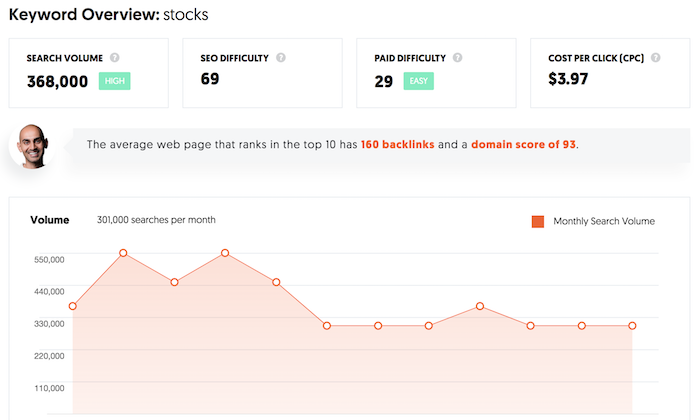
When I first got into the world of SEO, you could literally optimize your site for any term and rank at the top of Google within a month or two. But of course, that was ages ago. Now with Google’s ever-evolving algorithm, it takes more time and effort to get results. But what happens if you don’t have the luxury of time? Or you don’t have the financial resources to put in the effort that is truly needed. What should you do? Just forget about SEO? Of course not. Today, I want to call out 11 tools that will help you get an edge over your competition. But unlike most lists, I am going to get very specific on the feature I want you to use within each tool to make your life easier and help you get results faster with less effort. Let’s dive right in. Tool #1: Ubersuggest Projects You probably already know about Ubersuggest, but do you really have time to spend hours and hours each week to do your SEO? Chances are you don’t. So how do you improve your traffic with the least amount of effort? You set up a project in Ubersuggest. As you can see, it shows your SEO traffic over time. It will let you know if your rankings are going up or down, your link growth, and your SEO issues. With so many things going on in marketing, you don’t have time to manually check your rankings or if things are going up or down or even what you need to fix. Ubersuggest will do it for you all automatically and even notify you of what needs to happen through email. That way you don’t have to constantly check your SEO. Ubersuggest will do it all automatically. More so, you’ll get notified of what you need to focus on each week to maximize your traffic. All you have do is head to the dashboard and click on “Add Your First Project.” It’s as simple as adding in your URL. Then select the locations you do business in and want traffic from. Then add in the keywords you currently rank for or want to go after. And of course, set up your traffic preferences. And then you’ll be good to go. Then when things go great, you’ll be notified. And when things are going wrong, you’ll also be notified. Ubersuggest will even tell you what to fix. That way you get the maximum results in the least amount of time. Tool #2: Google Analytics Alerts You have Google Analytics set up on your site, but how often do you log in? And when you do log in, do you know what to focus on or what to look at? And if you do, do you know what to do with that data? Google Analytics is a great tool, but you don’t want to waste hours and hours looking at reports. Instead, you want to spend your time doing and getting results. But if you set up alerts in Google Analytics, you can save tons of time. If you watch from the 6:33 mark, it will show you how to set up alerts. I added the whole video as it will teach you how to set up Google Analytics in general in case you don’t have goal tracking set it place. Once you set up alerts, you’ll again get notified when anything good or bad happens. I usually have alerts set up for only when things go bad, so I know when I need to focus on fixing my marketing. Tool #3: Trello You’re probably thinking how the heck is Trello a marketing tool. It really isn’t, but it is a good project management tool. And with your SEO, you may have a team helping you out and Trello will help streamline the process, make you more efficient, and get your results faster. I keep my Trello board simple by breaking it into 3 sections. To do – what needs to be done over time. Prioritized – what I need to be done now (tasks at the top are the most important) Done – tasks that need to be double-checked to ensure they were done right. It’s that simple. That way you don’t have to micromanage your team. Some people have more complex Trello boards, but something simple like I have worked too. If you want to create a Trello board for your content marketing, assuming you want to write lots of content (such as 10 posts a week), this process works well. The columns I use for content writers are: Topics – this is where writers add topics they want to write about. Outline review – writers submit their outline before they write for approval. Draft – writers submit their rough draft. Draft review – editors review each draft. Uploaded, prepared, and ready to review – this is where the editor adds the post to your CMS (like WordPress). Scheduled – this is where you schedule the content to go live. Done – the content is now live. We’ve found it effective if you are managing dozens of writers at once. Tool #4: Content Decay Tool Can you guess how many articles I write each week? 1. Seriously, that’s it. 1 article a week which is roughly 4 to 5 per month (depending on how many weeks in the month). And can you guess how many articles my team and I update each week? 21. That’s roughly 90 a month. Just think about it… why would I have a team of 3 people updating 90 articles per month when I only write 1 a week. It’s because updating old content is an easier way to get more SEO traffic than it is to create new content. But what content should you update? The content decay tool will tell you that. It breaks down in order which articles you should update first, second, third… based on what will generate you the most

The SEO Tool Kit: 11 Tools That’ll Save You Time Read More »

How-To Content Isn’t Going Anywhere (and What That Means for Your Strategy)

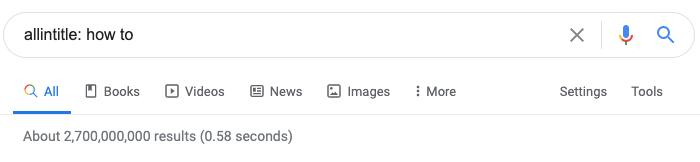
Posted by amandamilligan I’m a big fan of the Lore podcast, and in a recent episode, the host discussed a book called the Malleus Maleficarum. Two words starting with the “mal” prefix doesn’t sound super friendly, right? Well, the book is essentially a guide on how to identify witches and conduct witch trials. It turned out to have quite the horrible impact on society — as we’ve learned in history classes — but the host notes that it’s also one of the first how-tos ever written. And it was published in 1486, more than 500 years ago. How-to content isn’t new, and from what I can tell, it isn’t going anywhere. Look at how many search results come back when you narrow content down to titles including “how to.”  It’s not just that there’s a ton of this type of content, either. People want to read it. The prominence of “how-to” content My team at Fractl did a study about how different generations search online. We gave nearly 1,000 people this prompt: You just got engaged! It’s time to start thinking about the wedding, but you’re not sure where to start. What is the first word or phrase you would search using Google or another search engine? Thirteen percent of all the respondents’ hypothetical searches had “how to” in them, and the youngest respondents — millennials and Gen Zers — used it the most. It serves as additional proof for what we already suspected: how-to content remains a staple in the content world. And it makes sense, doesn’t it? How-tos not only lend themselves to the thrill of learning new information online (and the seemingly endless number of things that are available to learn); they also serve as a tool of empowerment. Even if you don’t know how to do something, you can figure it out just by going online and reading/watching/listening to content someone else put together for you. If people continue to desire this type of content, how can you make sure you’re incorporating it into your content plans accordingly? Finding how-to opportunities In some cases, it’s obvious how more how-to content can help your brand. Perhaps you’re a B2B SaaS company with a product designed to help teams collaborate online. You could write how-to articles about improving communication, transitioning to a new chat client, and plenty of other topics. It’s important to have these articles, because not only do they speak to a direct need of a certain audience, but they’re also directly related to your brand offering. They’re rife with more natural call-to-action opportunities, and they demonstrate your willingness to help solve a problem. This article by Brembo is a perfect illustration of this. After the helpful guide, they have a CTA to: “Just go to the configurator (www.moto.brembo.com) and enter some simple information about your motorcycle such as brand, engine displacement, model and year. The configurator will search through the entire Brembo line and quickly indicate which Brembo products are available for the selected bike, even including the pad compounds.” And voilà! You have a useful guide that ties directly into your product. However, the trick is making sure you’re seizing every opportunity and not settling on just the obvious how-tos. Here are some ways you can find creative new opportunities: Ask your audience. Run a poll on social media. Survey your email list. Call your customers. Whatever your preferred method, ask what they want to see! Get to know their challenges better so you can create content that will address them. Research what’s being asked online. You can start by going to Answer the Public or using BuzzSumo’s Questions tool. Both allow you to see what people are asking across the web regarding topics. But you can also look at similar content that exists and see what people are saying in the comments. Is there any confusion? Any points that still need to be covered? Talk to your sales team. They’re the ones “on the ground” discussing potential worries and concerns from your clients and customers. If you haven’t already, set up a regular check in with the sales department so you can stay updated on what questions are popping up that the marketing team can answer in its content. Additionally, for brands that might not have clear ideas for how-to content, it’s important to explore top-of-the-funnel opportunities, which you can do using the same tactics above. Top-of-the-funnel means that, while the how-to guides might not be directly related to your service offering, they’re still good for introducing your brand to people who are interested in your general industry. For example, like many other food brands, King Arthur’s Flour has recipes involving flour on their site. However, unlike many other food brands, their article, “How to make high-rising biscuits” has more than 94,000 engagements on Facebook, according to BuzzSumo. Now, this is arguably middle-of-the-funnel because you need flour to make the biscuits and it’s a flour company creating the content. But people looking this up probably already have flour in their homes. The benefit of creating this content is that now they’re familiar with this brand of flour, and if the recipe goes well, they have more trust in this particular brand. So, the article doesn’t have to be “how to choose the right type of flour.” It can be something your audience wants to know related to what you offer. Getting creative with how-to content Sometimes you want to create a guide that technically might already exist, but you want to do a better job in one way or another. That’s great! But it means going the extra mile, thinking outside the box, and every other cliche you can think of. And that doesn’t always mean doing something costly or extravagant. For example, because of the COVID-19 pandemic, the CDC released a piece about how to wash your hands correctly. Rather than sticking to the diagrams you see in restaurant bathrooms, they created a clean list of steps followed by a

How-To Content Isn’t Going Anywhere (and What That Means for Your Strategy) Read More »

What is LinkedIn Live? [+How to Leverage It in Your Marketing Strategy]

Every week, I use LinkedIn to talk about current events and connect with other content creators. And I’m not the only one. In fact, LinkedIn has had nearly 700 million active users in 2020 and has become one of the top social media platforms. In the last year, companies have started to use the social network’s new live-streaming technology. While Facebook and Instagram launched live streaming features in 2016, LinkedIn just recently decided to join the live streaming platforms. In February 2019, LinkedIn Live was launched to individual users. This year, it was announced that LinkedIn Live would also become available to business pages. With this announcement, LinkedIn decided “to bring you a tighter integration between LinkedIn Events and LinkedIn Live, by turning these two products into a new virtual events solution that enables you to stay connected to your communities and meet your customers wherever they are.” Live streaming continues to gain popularity among audiences. In fact, in 2019, internet users watched 1.1 billion hours of live video. Additionally, according to Go-Globe, by the end of 2020, live streaming is expected to account for 82% of all internet traffic. Plus, LinkedIn Live streams have increased by 158% since February 2020. Although LinkedIn Live isn’t available to all businesses right now, it might be time to start thinking about live streaming. To get started with LinkedIn Live, you can complete an application online to become a Live broadcaster. In this post, let’s review how you can leverage LinkedIn Live in your marketing strategy to attract new audiences. 1. Virtual Events With the recent integration of LinkedIn Live and LinkedIn Events, the social media platform is a great place to host your virtual events. LinkedIn virtual events allow you to meet your audience where they are and host your event in a trusted environment. Additionally, hosting a virtual event on LinkedIn Live will help you attract the right professional audience. You can share your events with your business page followers, plus you can send event invitations to your first-degree profile connections. Instead of taking videos during your virtual conference and posting them on LinkedIn later, LinkedIn Live allows you to connect with your audience in real-time. According to LinkedIn, LinkedIn Live is seeing 23 times more comments per host and six times more reactions per post than native video. With LinkedIn Live, you can engage and connect with your followers in real-time during your virtual events. 2. Recruiting LinkedIn is one of the main hubs for recruiters and job-seekers alike. In fact, recruiting is one of the top benefits of having a LinkedIn profile for individuals and brands. With LinkedIn Live, you can support your recruiting efforts by showing off your workplace culture, introducing team members, and answering questions from your audience. Additionally, you can host a live panel with employees on what it’s like to work for your company. Team members can discuss what their hiring journey looked like and give tips to people who want to work for your company one day. You can also host a Q&A with different people on your team to highlight their specific roles. For example, you can have them introduce themselves and their role, and then take questions about their day-to-day tasks and duties. If you want to use LinkedIn Live to support your recruiting efforts, think about other social media tactics you’ve implemented, and then strategize how those can convert into a live stream. 3. Thought Leadership One of the central LinkedIn strategies for most companies is to use the social media platform to position yourself as an industry leader. To do this with LinkedIn, you can discuss current events in your industry and boost your content creation strategy. Using LinkedIn Live, you can host a panel for industry thought leaders, including those at your company, to talk about industry trends and issues. Additionally, you can host a live stream dedicated to interviewing industry professionals and experts. Amplifying thought leaders and participating in industry discussions is a great way to use LinkedIn Live to attract new audiences. 4. Showcase Expertise Not to be redundant, but becoming an authority in your industry is an important part of your marketing strategy. LinkedIn Live presents an excellent opportunity to showcase your expertise. Using live streaming technology, you can share your tips and tricks with your audience. To do this, brainstorm how-to topics that your audience is interested in. If you’re struggling to come up with ideas, consider repurposing old content like blog posts or YouTube videos. Producing live streaming content will help you boost your content marketing strategy. 5. Announce a New Product or Partnership As a professional social media platform, LinkedIn is a great place to announce a new product or partnership. In fact, you might consider doing this on LinkedIn Live. You can bring on representatives from your company and partner company to discuss what the new partnership entails. This is also a great opportunity to educate and interact with your audience. By launching a product during a live stream, you can get immediate feedback from your audience, answer questions, and conduct a live demonstration. The announcement of LinkedIn Live proves that live streaming will continue to be an important tactic in your marketing strategy. In fact, this feature shows that consumers are interested in interacting with brands in real-time. If you’ve already used Facebook and Instagram Live, LinkedIn Live might be another platform to use and experiment with — especially if your audience is more likely to be on LinkedIn than other platforms. To learn more about how real brands are using LinkedIn Live, check out this blog post on LinkedIn Live examples.

What is LinkedIn Live? [+How to Leverage It in Your Marketing Strategy] Read More »

12 Reasons to Integrate Visual Content Into Your Marketing Campaigns [IG]

With some 1.7 billion websites worldwide, it’s fair to say the web of 2020 is a cluttered place. Plus, there are over 2 million new blog posts published daily. To help stand out from the crowd, it’s vital publishers create compelling and engaging content. But how do you go about creating attractive, engaging, and memorable content? The key is to make it visually appealing. The human brain processes visual content 60,000 times faster than text. That’s a huge disparity and goes a long way to explaining why images and videos are so key to driving engagement on social channels like Facebook, Instagram, Twitter, and LinkedIn. Simply put, visual elements are key for driving traffic and engagement across your sites and social channels. With all that said, what are the key visual elements you should be mindful of including in your content? Where do the opportunities lie and how can you engage your audience in the most meaningful ways? Fortunately, my team at Ever Increasing Circles has created the following infographic to explore key visual elements you should be mindful of including in your content — as well as where opportunities lie, and how you might engage your audience in more meaningful ways. Check it out, below.  

12 Reasons to Integrate Visual Content Into Your Marketing Campaigns [IG] Read More »

Managing a Franchise Network’s Social Media: Lessons Learned From Burger King

All franchise owners should have a social media plan in place for their franchisees to avoid potential online reputation management disasters, and to keep the brand voice consistent. In this post, we will break down what Burger King did to reach social media greatness, and see a crisis that occurred anyway. See the 7-step plan that can help you avoid social media problems in the future.

Managing a Franchise Network’s Social Media: Lessons Learned From Burger King Read More »

34 Free Online Marketing Classes to Take This Year

I don’t know about you, but I miss taking classes. I miss taking notes, studying, and most of all, learning a ton of new skills. That’s not to say I don’t learn a lot on the job here at HubSpot — because I absolutely do. But sometimes, there’s nothing quite like listening to a lecture, taking notes, and doing homework. Given the frequency at which new technologies and software are developed, it can be overwhelming to try to keep up your knowledge by only reading blog posts and ebooks. That’s where self-paced online learning comes in. I’ve taken a few awesome courses and certifications through HubSpot Academy, including an inbound marketing certification and a content marketing certification. These classes helped me be better at my job, so I started making a list of other classes I could take to learn more skills. When I finished the list, I realized that you, dear readers, might have similar skill gaps, so I wanted to share it in a blog post. Below is a long list of free online courses you can take to beef up your skill set. These offerings vary in time commitment, but many are self-paced so you can work on your own schedule. The topics these courses cover include: Content Marketing Social Media Marketing SEO Marketing Email Marketing Other Digital Marketing Courses Want to learn more about brands and organizations that offer the courses on the list below? Scroll to the end of this post, or click here, to jump to a section on where to find affordable online marketing courses. Free Online Marketing Courses Inbound Marketing Certification — HubSpot Academy Content Marketing Certification — HubSpot Academy Internet Marketing for Smart People — Copyblogger Viral Marketing and How to Craft Contagious Content — Coursera The Strategy of Content Marketing — Coursera Copywriting Blunders: Do You Make these 10 Common Mistakes? — Udemy Content Marketing for B2B Enterprises — Udemy Content Marketing — QuickSprout Social Media Certification — HubSpot Academy Developing an End-to-End Instagram Marketing Strategy For Your Business – HubSpot Academy Social Media Marketing — edX Diploma in Social Media Marketing — ALISON Blueprint — Facebook Social Media Analytics — quintly Social Media Week of Webinars — Buffer Digital Marketing Course — Google SEO Training Course — HubSpot Academy SEO Training Course by Moz — Udemy Advanced SEO: Tactics and Strategy — Udemy SEO — Quicksprout Email Marketing Certification — HubSpot Academy Email Marketing — QuickSprout Make a Website — Codeacademy Learn Javascript — Codeacademy Learn Ruby — Codeacademy Learn Python — Codeacademy Learn HTML & CSS — Codeacademy Learn to Code Awesome Websites — General Assembly What Digital Advertising Is & How to Do It – HubSpot Academy Paid Advertising – QuickSprout Creativity – Canva Wordstream PPC University Photoshop 2020: One-on-One Fundamentals – LinkedIn Learning InDesign 2020: Essential Training – LinkedIn Learning Content Marketing Courses 1. HubSpot Inbound Marketing Certification – HubSpot Academy 2. HubSpot Content Marketing Certification – HubSpot Academy 3. Internet Marketing for Smart People – Copyblogger 4. Viral Marketing and How to Craft Contagious Content – Coursera 5. The Strategy of Content Marketing – Coursera 6. Copywriting Blunders – Udemy 7. Content Marketing for B2B Enterprises – Udemy 8. Content Marketing – Udemy Social Media Marketing Courses 9. Free Social Media Certification – HubSpot Academy HubSpot Academy’s free online Social Media Certification offers eight lessons — from developing a social media strategy, to social media listening and moderating, to content strategy, digital advertising, and crisis communications. You’ll learn how to build an inbound social media strategy that delights your customers and grows your bottom line. 10. Developing an End-to-End Instagram Marketing Strategy For Your Business – HubSpot Academy 11. Strategic Social Media Marketing – edX 12. Diploma in Social Media Marketing – ALISON 13. Facebook Blueprint – Facebook 14. Social Media Analytics – Quintly 15. Social Media Week of Webinars – Buffer SEO Marketing Courses 16. SEO Training Course – HubSpot Academy 17. Google Digital Marketing Course – Google 18. SEO Training Course by Moz – Udemy 19. Advanced SEO: Tactics and Strategy – Udemy 20. SEO – QuickSprout Email Marketing 21. HubSpot Email Marketing Certification – HubSpot Academy 22. Email Marketing – QuickSprout Web Development and Site Design 23. Make a Website – CodeAcademy 24. Learn Javascript – CodeAcademy 25. Learn Ruby – CodeAcademy 26. Learn Python – CodeAcademy 27. Learn HTML & CSS – CodeAcademy 28. Learn to Code Awesome Websites – General Assembly Other Digital Marketing Courses 29. What Digital Advertising Is and How to Do It – HubSpot Academy 30. Paid Advertising – QuickSprout 31. Wordstream PPC University 32. Creativity – Canva 33. Photoshop 2020: One-on-One Fundamentals – LinkedIn Learning 34. InDesign 2020: Essential Training – LinkedIn Learning Where to Find Free or Affordable Courses HubSpot Academy HubSpot Academy offers certification and training courses to teach people how inbound marketing and HubSpot software work. Classes are often taught by marketers at HubSpot and are made up of video lessons, quizzes, and tests. Most HubSpot Academy classes are available free of charge, and if you pass the certifications, such as the two below, you get a nifty certificate and badge to share on your social media profiles. Check out mine on LinkedIn: Copyblogger Copyblogger is a content marketing company that creates content about content (so meta). Its blog provides a ton of great resources about digital marketing, and this class, “Internet Marketing for Smart People,” is made up of ebooks and emailed lessons and other course materials. Copyblogger espouses four pillars of content marketing success, which it delves into over the course of this class. Coursera Coursera offers MOOCs (massive online open courses) created and taught online by universities such as Northwestern University, the University of Pennsylvania, and the University of California system. These courses start at various times throughout the year, so browse the catalog to see when one lines up with your schedule. Below are a couple courses that are perfect for content marketers — here’s what a module

34 Free Online Marketing Classes to Take This Year Read More »

Understanding & Fulfilling Search Intent – Whiteboard Friday

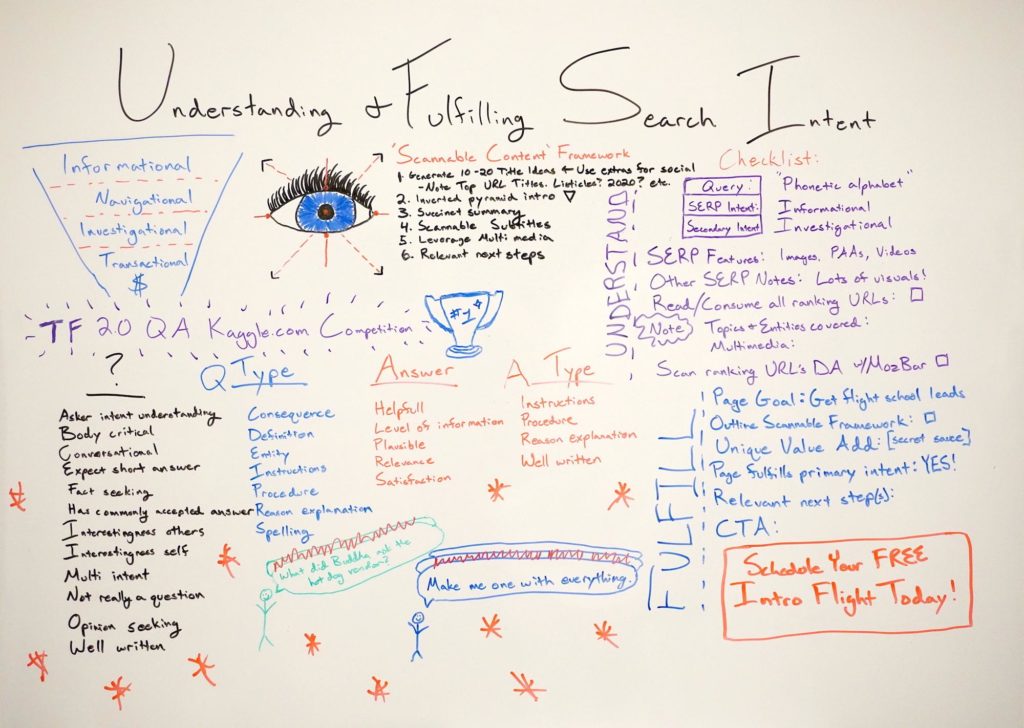
Posted by BritneyMuller Google houses the world’s information, and it’s their goal to serve the best answers to searchers’ questions. That means that understanding what your target audience is searching and why is more important than ever — but how do you effectively analyze and fulfill true search intent? In this brand-new Whiteboard Friday, Britney Muller shares everything you need to begin understanding and fulfilling search intent, plus a free Google Sheets checklist download to help you analyze the SERPs you care about most. Click on the whiteboard image above to open a high-resolution version in a new tab! Video Transcription Hey, Moz fans. Welcome to another edition of Whiteboard Friday. Today we’re going to be uncovering understanding and fulfilling search intent, and this is a really important topic to understand and better prepare your content around. I want you to think about this idea that Google houses the world’s information. They very likely know what the majority of people searching X are seeking, and they’re going to continue to get better and better and better at that. Understanding search intent What I would suggest you do and what you arm yourself with is this idea of really leaning on Google to better understand the intent behind any given search. You’re probably very familiar with the informational, navigational, investigational, and transactional-related intent types, and you can pull this information, like I said, directly off the SERP. Analyze: informational, navigational, investigational, transactional? You’re probably very familiar with the informational, navigational, investigational, and transactional-related intent types, and you can pull this information, like I said, directly off the SERP. Is there a featured snippet?  Is there a knowledge graph? You can pull that sort of information.  Are there site links?  Is it navigational in nature, people just trying to go to one destination?  Is there a comparison table?  Are they perhaps investigating? Transactional, are there tons of ads?  Are there lots of product pages showing up in the results?  Is there a shopping carousel?  You can pull intent types directly from the search. What’s interesting though is any given SERP doesn’t necessarily have one intent type. In fact, it likely has a couple of nitty-gritty intent types that Google themselves haven’t quite totally figured out. I want to pull back the curtain on how Google is actively trying to get better at understanding intent within questions and answers within content. They put up a competition to a bunch of data scientists to determine if anyone could build a model that can accurately weight these various intents with the content.  Question information There’s question information that they wanted the model to predict around: Is this fact-seeking? Does it have multi-intent? Is it not really a question? That’s my favorite. Is it well-written?  Asker intent understanding Body critical Conversational Expect short answer Fact-seeking Has commonly accepted answer Interestingness to others Interestingness to self Multi-intent Not really a question Opinion-seeking Well-written Question type Then they’re also trying to understand the type of question. Is it a definition? Is it instructions? Is it spelling, which is most of my searches?  Consequence Definition Entity Instructions Procedure Reason explanation Spelling Answer information Then they get into answer information. Is the answer intent helpful? Is it plausible? Is it relevant? Does it satisfy the question?  Helpful Level of information Plausible Relevance Satisfaction Answer types They even drill a bit deeper into answer types. Is it instructions, procedure, well-written?  Instructions Procedure Reason explanation Well-written Again, you see these sort of themes occur. So it’s important it’s not just these four. It’s great to know these and sort of run with them a bit. But put these in your back pocket and know that it goes a lot deeper and it’s a lot more complicated than that. Search Intent Checklist Let’s dig into this checklist of sorts. The idea behind this is that there’s a Google sheet that you can have today, make a copy and tweak however you’d like, that walks you through really this first process of understanding the intent and then fulfilling it. Make a copy of the Search Intent Checklist Once you do this a couple of times, you’re not going to need this checklist. This will become second nature to you. Let’s just walk through what this looks like.  1. Uncover the SERP intent First, what is the primary SERP intent? For my example, I have phonetic alphabet, informational. Secondary intent might be investigational for the types of content people are looking for. 2. List any SERP features and other SERP notes I list the SERP features that I notice in the search results. I’m really just making mental notes of what I’m seeing. So for this particular SERP, there were a lot more visuals than I expected, and so I made note of that. That kind of surprised me. I also made note this is the order of the features that are showing up. 3. Read, consume, and take notes about the ranking URLs The next thing you do is to read and consume all of the ranking URLs. This is so, so important if you’re serious about ranking for a particular keyword. You should actively be consuming this content and making notes about topics and entities covered.  What sort of multimedia are they using? What are the layouts?  What does it feel like?  You can really start to have a better checklist of what does that content look like and what are those expectations.  4. Scan ranking URLs’ Domain Authority with MozBar Then, ooh, my favorite secret hack is to activate MozBar for the search result page. You can see the Domain Authority and the backlinks for every single URL on a SERP. A lot of people don’t know you can use MozBar directly within Google search results, and it’s fantastic. What I use this for, if I want to rank for something like this, I would just evaluate all of the organic DAs, and I would really evaluate that range and see

Understanding & Fulfilling Search Intent – Whiteboard Friday Read More »

What is Localized Content [+When to Use It]

For businesses to grow in today’s climate, marketers must think about their content and strategies on a global scale. The internet has opened doors to new markets around the world, and yet, without paying proper attention to these new customers’ preferences and culture, marketers can miss out on significant opportunities. So, how can marketers make sure their content is prepared for when new markets open? Localized content is the key to catching new customers’ attention and creating a place where they want to spend their time and make their purchases. With content built around a personalized experience, you can guide new customers through the customer lifecycle, regardless of where in the world they live. In today’s post, we’ll discuss what localized content is and when to use it. When we talk about entering new global markets, the first thing that might come to your mind is translating content. After all, it should be as simple as running your content through Google Translate and sending it off to customers on their journeys, right? Not so fast! Translation is a complex process. While machine translations like Google Translate can churn through low-value content with relative ease, your high-value content deserves a more personalized touch — not only the words we use, but how we use them, matter. Otherwise, we’re holding a conversation without context, and customers won’t be able to build a relationship with you. While the words matter, other elements of your presence in a new market matter as well. Consider your website: you might be displaying images that make sense to a North American audience. But would a customer in Asia understand the photograph? Could they see themselves as one of your customers? This kind of thinking must be evident through every bit of your presence. Pictures and colors should match a customer’s cultural expectations. Prices should be shown in their local currency. The brand logos you display should be recognizable in-market. These elements all come together and tell your brand’s story to your customers in both a conscious and subliminal method. Companies that understand localization are best suited to adapt their content to a customer’s culture, language and mannerisms. While translators are focused on the words of your content, localization also customizes currency, dates, units of measurement — the factors that seem small but add up into a truly welcoming experience for a global customer. The need for localized content is growing in tandem with the expansion of global markets. The internet serves as the primary medium for reaching these new customers, because of all the internet users in the world, just 7.6% live in North America. For context, more than 50% live in Asia. If your content is only targeting North American buyers, then you’re missing out on most of the world’s internet traffic — and the customers it brings. Customers are equally discerning about their purchases regardless of where they live. They expect the same personalized brand experience that North American customers would receive. When you localize content, that desire for a personalized experience should guide how you reformat and alter content to suit a new market’s culture and expectations. You should be conducting research into cultural norms just as you would for any other part of your product or selling process. Did you know orange has a specific religious connotation in Northern Ireland? Or when you translate text from English to Finnish, the size of your content could expand up to 60%? Your global customers will expect you to not only know about these minute differences but also create content that capitalizes on it. They want to be impressed just like their English-speaking counterparts. It falls upon marketers to create content that gives potential customers everything they need to make purchasing decisions. With an attentive eye toward researching a new culture, you can set up your brand to create memorable experiences with customers and build brand loyalty. Localize Content for the Customer Lifecycle To build brand loyalty, you will of course need a hefty amount of content ready to localize to different markets. Depending on how much content you need, the amount of localization to do can grow very quickly. For example, if you have three buyer personas you plan to target with content, and you’re localizing content for five languages, you’re spending time and resources to prepare one piece of content in fifteen different ways. Take that example and expand it to websites and other content media you’re using, and that number likely grows even higher. When you’re beginning to localize content, it pays to be smart about which pieces you localize first. Like your native language-based content, you know certain pieces perform much better than others, or provide a high amount of value to customers. When you enter into a new market, consider that customers are going to follow the customer lifecycle model: discovery, education, purchase, post-purchase engagement and advocacy. Just like how you would guide a customer through the lifecycle in your native language, your global customers will also buy this way and expect a similar path to follow. Since you’re producing content for each stage in the lifecycle already, that content is likely high-value content primed for localization. Let’s review the content that will need localization in each stage of the customer lifecycle. Discovery Customers are beginning to be made aware of your company and the products you offer. At this stage, your content is focused on creating brand awareness, with social media ads or introductions to your product offerings. Ensure content like product descriptions are translated properly and include the context of your new market. Many cultures find video content from brands to be appealing, so think about localizing video content with not only subtitles but also local imagery or showcasing products they would know. Education Customers have been doing their research and want to know more about your brand and your products. For your native-language content, you likely have a knowledge base with articles or FAQs sharing more about

What is Localized Content [+When to Use It] Read More »

19 Ways to Spend Your Marketing Budget Next Quarter

The tough part is over — your budget’s been approved for the next quarter. But now, another challenge looms how to spend that money. You might be a little lost about how best to allocate your budget. Consider the resources and tools your team needs to do their jobs well. Additionally, leave a little room for celebrating your team for their wins — both big and small. So, how do you accurately plan out that perfectly balanced budget? Whether you have “use-it-or-lose-it” funds left over from the quarter, or are putting together a budget for the first time, here are some guidelines for allocating that money effectively. 1. Test new versions of calls-to-action that are performing poorly. Estimated cost: $50 per call to action In your analytics software, sort calls to action by click rate and conversion rate. Then, redesign ones with the lowest performance and test them. One way to do this is by performing an A/B test, which will show you which design your audience prefers. Perhaps a simple design change is in order to attract more visitors, like choosing a different photo. Or, maybe tweaking the wording can strengthen the connection you make with leads. This test will be useful in identifying the best ways to further prospects along in their buying journey. 2. Identify improvement opportunities on your homepage. Estimated cost: $150 Install heat map tracking software, like Hotjar or Crazy Egg, on your homepage. This software will show where people are clicking and how far they are scrolling down the page. Image Source These tools will help you determine if your audience is finding the content you want them to see the most. You’ll gain a good idea of if you need to restructure your webpages to be more effective. 3. Revise landing page copy. Estimated cost: $150 per page There’s always room for improvement on your landing pages. Start with pages that have conversion rates of less than 20% and rework the language to tune it into your target persona’s needs. If you are unsure which language will resonate with your audience, conduct keyword research and perform A/B tests. Additionally, do a little social listening. These methods will help you understand how to connect with your audience on multiple pages. 4. Find SEO keyword opportunities on your website. Estimated cost: $250 SEO keywords help you use language that improves rank on search engines and boost acquisition. For instance, if you spot a couple of offers that aren’t performing as well as you’d hoped, research the keywords surrounding that topic and revise your offers accordingly. Find software that has built-in SEO tools, like HubSpot’s CRM. These tools optimize your content to get found on search engines. 5. Do a social media engagement analysis. Estimated cost: $250 An analysis of social media messages will reveal which received the most engagement. Find out what worked best for your business. If you find that one or two channels are outperforming others, you can begin to infer how to plan for its use next quarter. Maybe you invest more into successful messages or deactivating underperforming accounts. Or maybe you’ve found that there’s a huge YouTube audience you’re missing out on. Look at your analysis and decide if YouTube is worth investing in moving forward. Check out this resource for growing a YouTube audience in a little over a year for quick tips. 6. Conduct a usability test. Estimated cost: $350 A usability test gives real feedback from potential customers. Similar to the results you get from a Net Promoter Score, you’ll figure out what customers are and aren’t liking about your web pages. Using the results from a usability test, figure out how to revise the content on your website to be more user-friendly. For instance, if you find that your product pages aren’t effective, you can mark this as a place to work on for the next year. 7. Try ad retargeting to boost performance. Estimated cost: $500 Ad retargeting catches those visitors who almost converted into customers. They bridge that gap so the process is completed. Retargeting ads give you the chance of hooking in a previously interested lead with a new, personalized offer. Ad retargeting can give your acquisition numbers a boost. Look for ad retargeting options on social networks like Facebook, so you can build and revise ads within the channel. 8. Experiment with social media advertising. Estimated cost: $500 Social media strategies should be evolving as customer behavior evolves. When you hit a block with planning, mix up your strategy. Try a new channel or a new approach with a network you’re already using Advertising with social media takes some experimentation. Knowing your audience and conducting social listening gives you an idea of how and where to reach your audience, but knowing which copy, format, and design will be a hit calls for some testing. 9. Invest in employee knowledge. Estimated cost: $500 Because marketing is an ever-changing industry, investing in learning opportunities makes your team well-equipped to excel in their day-to-day tasks. Training can come in the form of ebooks, blog posts, or webinars. Additionally, scope out courses online that will give team members a deeper understanding of the industry. For example, HubSpot Academy offers courses about content marketing, social media marketing, and sales, in digestible, interactive lessons. Courses update as needed, so you don’t have to worry about getting a certification for an outdated skillset. 10. Celebrate your success of the past quarter. Estimated cost: $500 Remember to allocate some funds to celebrate your colleagues and their wins for the quarter. This doesn’t have to be a huge blowout party, but it could be something small, like sending colleagues a care package, that will remind your team their hard work is appreciated. Come up with superlatives and present them in a year-end meeting. Awards like “Best Movie Buff,” or “Funniest Marketer” build up morale. 11. Perform customer research. Estimated cost: $500 Customer research is important. You may have done previous customer

19 Ways to Spend Your Marketing Budget Next Quarter Read More »